 Scams are becoming more sophisticated over time, but this latest scam should be a wake-up call to all organizations and employees as to how far some scammers will go to damage your organization or its stakeholders.
On March 31, 2026, malicious hackers hijacked the development account of a lead maintainer of a popular open source product called Axios used by many companies. It has over 100 million downloads a week.
Note: The Axios involved here is not Axios, the news media company.
The hackers, reported likely to be North Korean nation-state hackers, compromised the Node Package Manager (npm) account of Axios lead maintainer, Jason Saayman. NPM is a popular open source development repository (like GitHub), particularly around JavaScript and node.js programs. The ‘npm’ command is commonly used to install programs into Linux and other types of distributions. A user or administrator can type in something like: ‘npm install ’ to install a program. Maintainers upload code updates to NPM so that users and administrators can download, install, and update the software they want to use.
Using the Axios maintainer’s compromised account, they published two fake malicious versions of Axios, axios@1.14.1 and axios@0.30.4. These versions injected a fake dependency, plain-crypto-js@4.2.1, which executed a malicious post-install script to silently deploy a cross-platform (e.g. Microsoft Windows, Linux, MacOS) malicious remote access trojan (RAT) program targeting developer machines and development pipelines without modifying the Axios source code itself.
Users and administrators downloading, using, and updating Axios unknowingly installed the malicious backdoor into their systems, allowing the hackers to gain access to their systems.
But the scam started two weeks ago.
We are very fortunate that the involved maintainer, Jason Saayman, went public with what happened and how he was scammed. If I could give him an international award, I would.
Here is what Mr. Saayman shared and also from screenshots posted here.
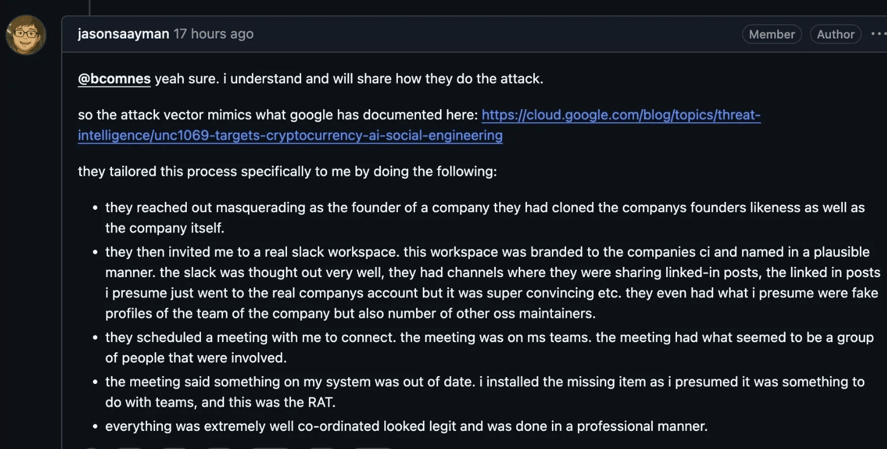
The scammers reached out to Mr. Saayman, posing as the founder of a company that Mr. Saayman knew and admired. They then invited him to a private Slack workspace (instant messaging channel). It was “branded” to look like the real company and included a history of previous communications that made it look authentic. Let that sink in. The attackers took time to create a fake history, including other fake employees and profiles, so that when Mr. Saayman was looking through the Slack channel, he would get visual clues that reinforced that he was interacting with a legitimate company.
On Slack, they sent him a Microsoft Teams invite. When he connected using his Teams client, he got a message (shown below) saying he needed to update his Teams.
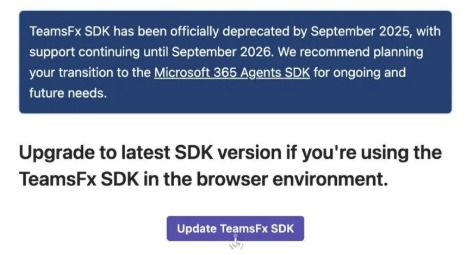
Let me say, being asked to update or install any software to participate in a popular chat program should be a red flag for anyone. But I think it’s not that crazy a message. We get stuff like that all the time. So, I can see a large percentage of people who think they are dealing with a legitimate organization falling for this part of the scam.
Mr. Saayman then got a message saying he needed to copy, paste, and execute a bunch of PowerShell commands (shown below). When done maliciously, this is known as a “Click Fix” attack.
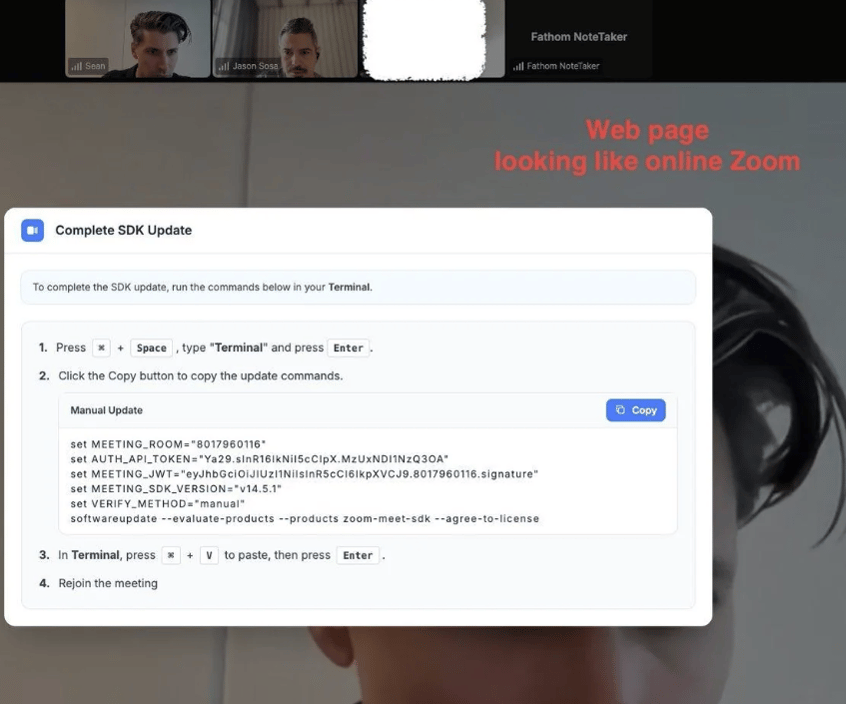
Note: I’ve written about Click Fix attacks many times over the last year, including here.
This is the point at which most cybersecurity experts go, “What!!??”
And, yes, this should have been a HUGE red flag to whoever was involved. You should never have to copy, paste, and execute code to install a legitimate update or attend a meeting.
But Mr. Saayman is not a cybersecurity expert and obviously didn’t know that Click Fix attacks are among the most popular types of attacks occurring these days. However, I’m actually a bit surprised the attackers had him run the Click Fix commands because they could have accomplished what they needed by having him install the initial fake software update alone (assuming there was one before the Click Fix portion of the attack).
Just speculating, perhaps the whole fake SDK update was just the Click Fix commands. Attackers use Click Fix attacks because it allows them to get around nearly every defense the user has installed on their computer and network. It gets past firewalls, antivirus, endpoint detection and response (EDR) software, and more.
But tens of millions of people have fallen for Click Fix attacks over the last year, so Mr. Saayman is just one more. I thoroughly believe anyone can fall for the right scam with the right message at the right time. Anyone! Even me. Yes, even you. Mr. Saayman fell for this one. Part of the reason is that all the initial Click Fix information he could see seemed legitimate. The malicious code was intentionally hidden further down in the commands. The attackers had hoped their potential victim would see the top, visible portion, and just assume the rest were legitimate commands, too.
Plenty of end users and developers would fall for this scam. That’s why you need to educate everyone around you about them.
This gave the attackers control of Mr. Saayman’s computer. Maintaining Axios is only a side job of Mr. Saayman. He also works full-time for his employer and does other work and hobbies. They could have robbed Mr. Saayman of his bank account money, stolen his credit card information, and so on, if they wanted. But they were after bigger things.
So, they compromised his npm credentials, maliciously modified the Axios package in a way that didn’t set off any alarms. They really did think about this stage of the attack ahead of time. They didn’t just maliciously update the Axios code. They injected two benign updates to establish a publishing history.
Then they waited. I assume they were also testing to see if they were detected. They were not.
Then, 18 hours later, they updated the post-install script that runs after most npm installs. That post-install script installed the malware.
The malicious Axios versions were live for 2.5 hours and impacted about 3% of environments.
They had also updated the email address that Mr. Saayman used for npm on his account so any alerts would be sent to the attacker’s email address instead. Smart. I’m not sure if Mr. Saayman was sent a notice by the npm platform that his email address was updated, but if he was, he didn’t see it in time or register what was happening. Since the attacker controlled his desktop, they could have easily intercepted the incoming alert email, even if it was sent.
For more information on the attack, see:
- https://blog.dreamfactory.com/the-axios-npm-supply-chain-attack-a-complete-technical-analysis-of-the-maintainer-hijack-cross-platform-rat-and-enterprise-impact
- https://unit42.paloaltonetworks.com/axios-supply-chain-attack/
Defenses
Here are three defenses to deploy:
Education
It is harder to fool someone who is aware of a specific type of attack. Educate everyone about this specific type of attack, particularly the sophistication, involving the attackers preparing a fake lookalike company, websites, profiles, history, Slack and Microsoft Teams channels. Not every attack is a simple email containing a link trying to get you to do something immediately. These attackers planned, prepared, and took their time.
Take time to educate about sophisticated attacks in general. This is just one example. Make sure you, your family, friends, and co-workers know that sophisticated attacks abound and are growing in popularity. My talk at RSA a few weeks ago was about this exact topic. It’s a popular topic I speak about these days. You can watch an earlier version here as well.
Make sure your developers are educated about sophisticated scams in particular. They are supply chain targets.
You cannot trust anyone to be who they say they are, especially in times of AI deepfakes.
Phishing-Resistant MFA
Use phishing-resistant Multifactor Authentication (MFA) whenever you can to protect valuable information. Most MFA is barely better than passwords. Use phishing-resistant MFA (e.g., FIDO-enabled YubiKeys, etc.) when you can.
Note: Here is my list of phishing-resistant MFA.
I love phishing-resistant MFA that involves SEPARATE hardware for the best protection. Phishing-resistant MFA, like FIDO passkeys, is good as well (because they require a physical gesture to work), but I prefer separate hardware involvement (like FIDO-enabled YubiKeys) if you want the very best protection.
Developer Isolation
Developers should always have separate, isolated environments in which to work. They can then do their development work on one computer and everything else on the other. Separate physical computers are best, but any type of nearly complete isolation, like a virtual machine, is better than nothing. Although in this case, what was initially compromised was basically Mr. Saayman’s side job and not his full-time job. Still, if you’re a developer or maintainer of a popular and vital piece of software or service, isolate. You owe it to the community.
I want to again thank Mr. Saayman for sharing the details of his scam. I think many Internet users and developers would have fallen for the exact same scam. It could have been any one of us (if only involving a different scam).
Spread the word of the growing sophistication of scams. This will be more of the rule over time than the exception, especially as malicious use of AI grows.