 Fake calendar invites have been a problem on Gmail for years. Even though they could appear on other calendar services, I hadn’t seen or read about a lot of it. Gmail had been taking the brunt of the fake calendar invites.
However, I got a scam Microsoft Outlook calendar invite recently, and other Outlook users are complaining more as well. So, what was previously happening mostly in Gmail has now moved over to Outlook, too.
I am a busy guy. I get probably a dozen calendar invites a day, on average, but I was surprised to see the following appointment in my Outlook calendar (see below):
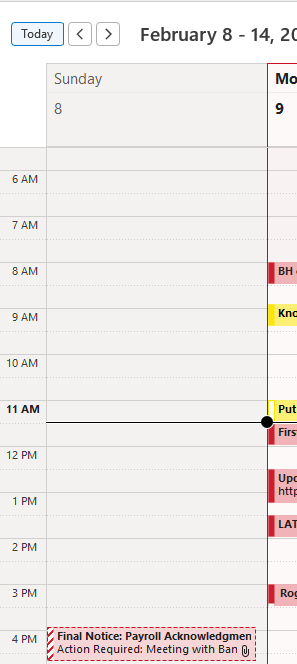
It was more obvious because it was on Sunday, a day when I have the least amount of appointments. The title of the calendar invite, “Final Notice: Payroll Acknowledgement Required” is definitely scammy looking from the start. The “Final Notice” part fits the common false sense of urgency most phishers push with their messages.
I went and found the related email in my inbox (shown below).
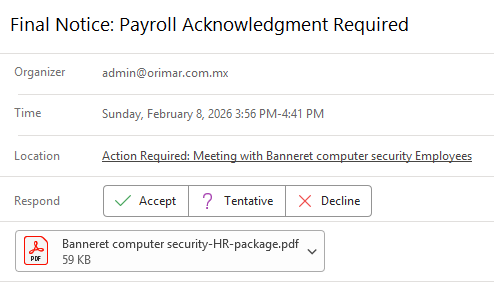
There is no doubt this is bogus. For one, Banneret Computer Security is a defunct company I ended decades ago. But I still use the domain name I got for that company for my personal email address. I’ve been too lazy to update it. Don’t fix what isn’t broken. So, the scammers did some sort of Whois domain lookup to get my information and sent me a scam calendar request.>
They used the domain and company name to create the location and file attachment name.
The email’s originating address domain orimar.com.mx passes (and fails) DMARC, SPF, and DKIM checks (as shown below).
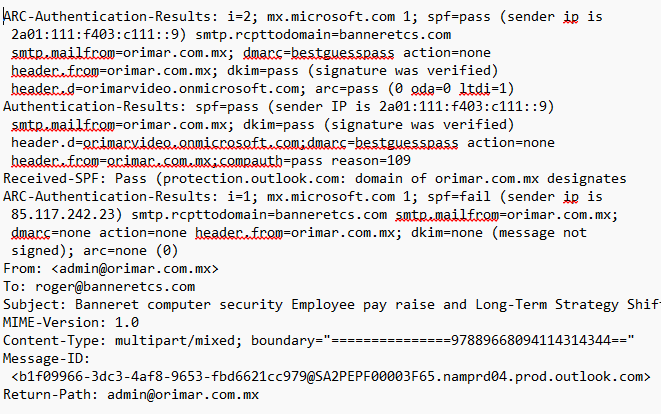
DMARC is a set of open standards (DMARC, SPF, DKIM) that attempt to prevent sender email domain spoofing.
If you want more information on DMARC and DMARC checks in general, read my LinkedIn post, here.
Here is a free 1-hour webinar on DMARC.
I do see one failed SPF check, which means the email failed an SPF check in one of its SMTP relays (there were a total of 8 email relays/servers involved) on the way to my inbox.
When you forward an email, all the previous header information is removed, but if it is sent through an intermediate SMTP relay (for example, an antivirus email server), it can be checked for DMARC, SPF, and DKIM at each intermediate stop. The checks and their status can end up in the email’s message header, but previous DMARC checks are not read or evaluated by subsequent SMTP servers. Each server’s DMARC checks stand on their own. The last receiving email server does its own DMARC, SPF, and DKIM checks, and if the email passes those checks, the email will be given a clean bill of health, unfortunately.
I put the email’s header through Mxlookup’s Email Header Analyzer to help me out further. It revealed the following about the message’s DMARC status (shown below):
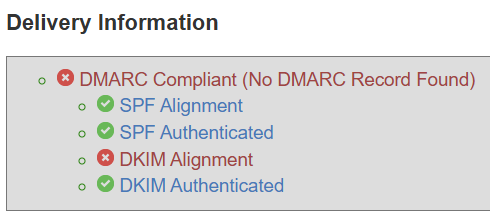
The message passed DKIM Authentication, while DKIM Alignment failed. The failed DMARC check is an important one. DKIM Authenticated means the message was signed and sent by a valid DKIM server with a valid DKIM certificate and key, and that message was not altered during its routing. That’s good. But the DKIM Alignment failure means that the DKIM server that signed and processed the message did not match the sender’s claimed email domain that shows in the message’s FROM address field.
DKIM alignment failures can happen for a bunch of reasons, including misconfiguration. However, any DKIM failure must be treated as a complete failure. You can’t take any chances. I’ve seen plenty of valid, legitimate messages have this exact same problem (e.g., DKIM Authentication passed and DKIM Alignment failed), but you can’t take a chance.
This is a great article on DKIM alignment.
I can see that at some point, the email had a different subject line, “Banneret computer security Employee pay raise and Long-Term Strategy Shift.” That’s weird. I have never seen that before. Interesting.
The email arrived from the domain orimar.com.mx. Mx is the domain country code for Mexico. But I couldn’t find any information on the domain. It was already blocked by my Internet access provider, unfortunately. I tried a second source and it, too, also blocked the domain. Well, that’s great for protection purposes, but not so great for forensic investigations.
I opened the attached PDF (never do this unless you have a safe, secure place to open it) and saw this:
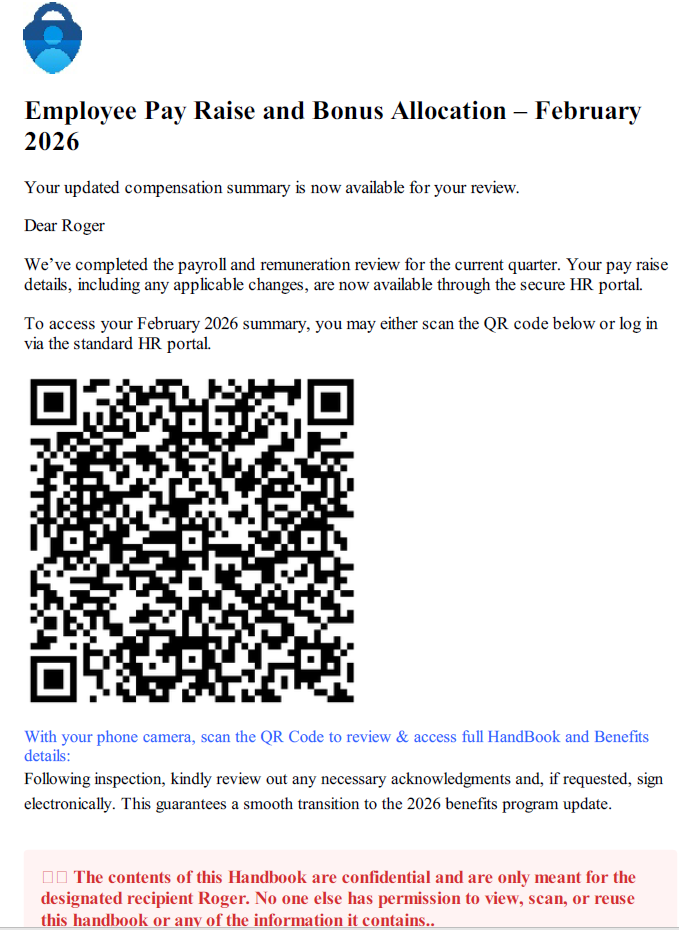
I decided to follow the QR code and it took me to the following domain:

That was then decoded to this:

Going to https://illustrator.fretreacro. dev - a simple house cleaning website, with most of the functionality not enabled. The .dev tells me it’s probably a development server. The website is likely just a fake website someone put up to show what they could do with a simple e-commerce website. Development servers are more often poorly secured, which is probably why the hacker took it over for their scam.
I was met with a CAPTCHA (shown below):
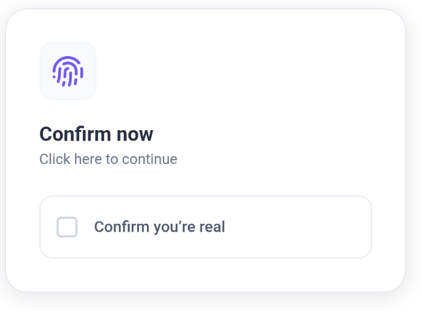
CAPTCHAs used by scammers are very, very common today. They want to make sure you are human (and a potential real victim) and not some anti-malware content filter vendor using automation to detect, explore, and remove the scam.
I clicked on the CAPTCHA and then I was shown this:
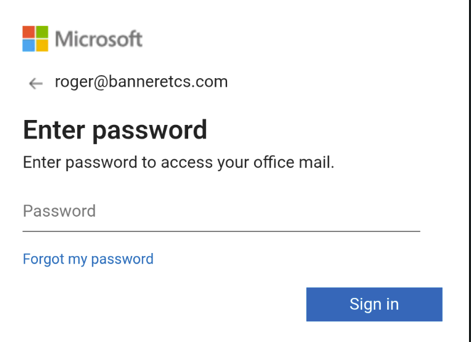
Ah, they are trying to collect my Microsoft 365 account login information. Pretty standard stuff.
How To Defend
Here’s what you can do to stop these unwanted calendar invites from popping up on your Outlook calendar without first approving.
- Open Outlook.com or the Microsoft Outlook app and navigate to Settings (gear icon).
- Select View all Outlook settings.
- Go to Calendar > Events from email.
- Turn off the option Automatically add events from email to my calendar by selecting Don’t show event summaries in email or on my calendar.
- Save your changes.
Personally, I like seeing recently sent calendar invites on my calendar to let me know someone sent me one to review. There’s very little harm in letting a malicious invite sit on your calendar as long as you are not fooled by it. But if you are worried you might forget and think a scam invite is a real invite, go ahead and disable the automatic adding option as shown above.
Now, I have to worry about fake Gmail and Outlook invites.