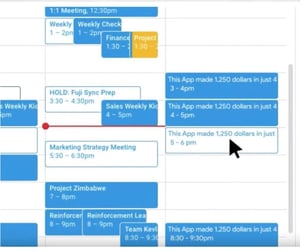
 We’ve noted this particular scam before, but it’s continued to make a pest of itself, and so we bring it to your attention again. Scammers are abusing Google Calendar invites to send out unsolicited, spammy events, according to Rob Verger at Popular Science.
Attackers only need your Gmail address to send you an invite, and the event will be placed in your calendar by default. Verger notes that the spam itself is nothing new; the scammers are simply using a previously obscure technique to place it in front of you.
“While the location of the spam feels new, the behavior isn't,” he writes. “Bad actors have a long history of exploiting any avenue they can, from sending suspicious messages to your email address, to spammy notes sent via iMessage, to robocalls.”
You can block this behavior by going to your Google Calendar settings, then making your way to Event settings and switching “Automatically add invitations” to “No, only show invitations to which I have responded.” Next, locate the “Events from Gmail” option, and uncheck “Automatically add events from Gmail to my calendar.” Verger says to keep in mind that these changes will turn off legitimate automatic invites as well. Google made a short video that shows how to do this:
“Like many security issues, there are tradeoffs to your choices,” he explains. “Some people may like that their dinner reservations automatically populate their calendars—so make whatever decision here you feel is best for you.”
Verger adds that if you don’t turn off automatic invites, you should report any spam that shows up in your calendar, which will remove the unwanted event and hopefully help Google counter similar occurrences down the road.
The calendar spam on display in the recent campaigns is annoying but generic phishbait. However, it’s easy to imagine how this technique could be used in more targeted and sophisticated attacks. New-school security awareness training can enable your employees to resist both advanced and simple phishing attacks, no matter where these attacks show up.
Popular Science has the story: https://www.popsci.com/google-calendar-spam-what-to-do/