Lead Analysts: Karthikeyan D, Prabhakaran Ravichandhiran, Jeewan Singh Jalal
A legitimate sender does not mean legitimate content. Attackers have abused legitimate services such as DocuSign, SharePoint, Adobe Sign, Dropbox and Google Drive to exploit that trust for years.
KnowBe4's Phishing Threat Trends Report Vol. 7, released April 2026, flagged this shift at the industry level: 22% of all phishing attacks are now sent through a legitimate platform, with attackers moving from impersonating a brand to abusing that brand's actual infrastructure.
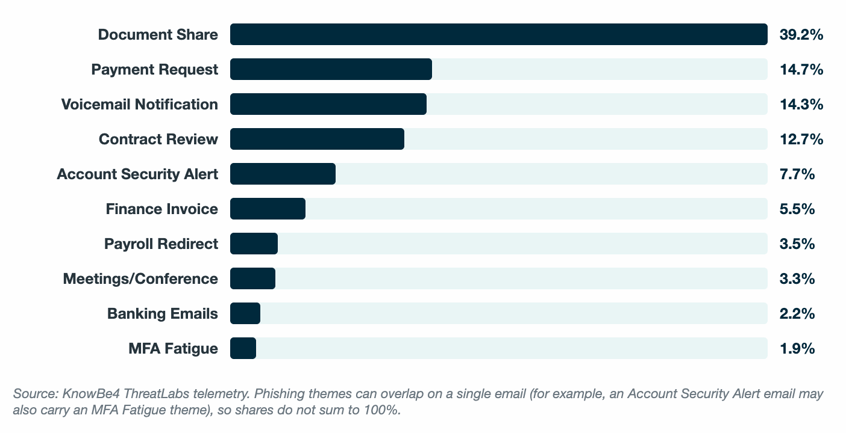
In this article, our Threat Lab analysis examines that shift at the platform level, measuring where and how often it happens across specific services. Document-share lure alone accounts for 39.2% of the phishing emails tracked, the largest single theme. That figure covers phishing themes broadly. Most “document share” lures never touch real platform infrastructure. The Living Off Trusted Services (LOTS)-specific numbers below are narrower and the more important finding: a much smaller slice of total volume, concentrated heavily in a handful of platforms.
Imagine this scenario: It's the beginning of a business day, and one of your users opens an email from a trusted online SaaS platform used in their organization that reads "Payment Received — Confirmation Details."
The sender address is real. The branding is real. The email sailed through the company's security gateway without a single flag, because there was nothing to flag. It's a genuine notification from a genuine platform. The only thing in it that isn't genuine is the link behind the button.
That's the pattern KnowBe4 ThreatLabs is now tracking at scale. Attackers aren't breaking into email security. They're routing around it, using the exact platforms your team is trained to trust.
Why Do Cybercriminals Use Service Lures?
KnowBe4 researchers have observed a significant spike in phishing campaigns using the Living Off Trusted Services (LOTS) framework. By leveraging high-reputation SaaS platforms, cybercriminals effectively bypass secure email gateways (SEGs) and traditional spam filters to execute credentials theft and deploy malicious payloads at scale.
Cybercriminals systematically weaponize high-reputation SaaS platforms including DocuSign, SharePoint, Adobe Sign, Google Drive and Dropbox, taking advantage of their ubiquitous presence in daily business operations for distributing legal contracts, financial documentation and essential corporate files. As these enterprise services are deeply integrated into routine organizational operations, automated alerts generated by them possess intrinsic credibility, drastically increasing the probability that recipients will engage with malicious prompts.
The Trend: What Service Lures Are Most Common?
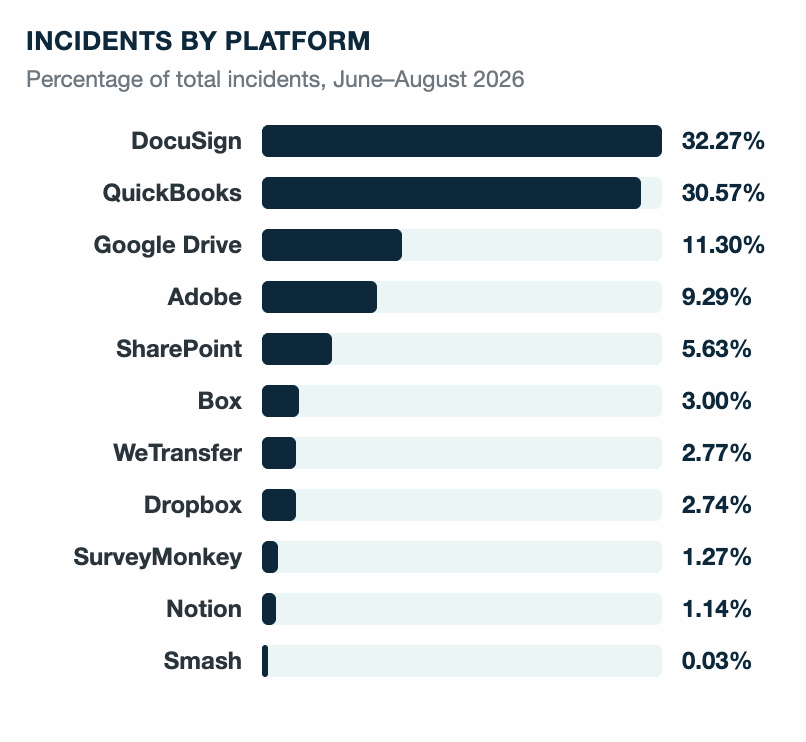
Out of 544,000 threat emails between June and August 2026, LOTS techniques alone accounted for 53,000 of them; nearly one in every 10 threat emails tracked. DocuSign and QuickBooks alone account for nearly two-thirds of that volume.
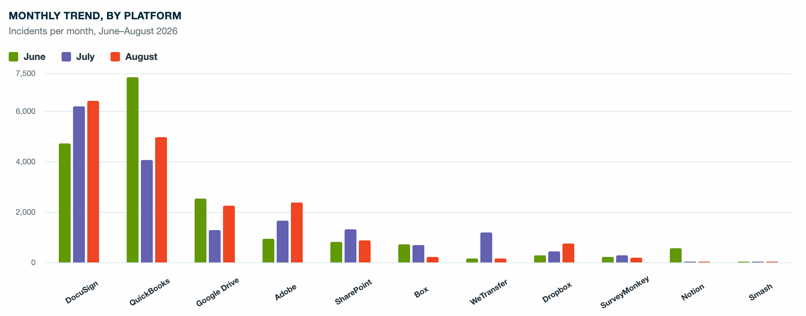
The month-by-month breakdown shows where attackers are shifting, not just where they've already landed. DocuSign grew every month. That's a steady climb that points to sustained abuse rather than a short-lived campaign. Adobe and Dropbox show the same growth pattern: Adobe volume grew over the same period, and Dropbox volume nearly tripled. That kind of consistent, month-over-month growth is the clearest sign of a platform attackers are actively expanding into.
How Do Threat Actors Exploit Document Platforms?
This analysis shows why these platforms work so well for attackers: employees already trust them in both corporate and personal settings, which makes it easier for attackers to slip past security filters.
Some platforms automatically notify users when someone shares a document with them, which adds to the illusion of legitimacy. SEGs often let these emails through because they come from reputable domains, so malicious links still reach the recipient's inbox.
A few platform features unintentionally help attackers. DocuSign's link-expiration setting, for example, can make it harder for investigators to review an attack after the fact. On platforms such as Adobe and Dropbox, malicious documents can stay live for days before the platform processes a takedown request, giving attackers plenty of time to run their campaign.
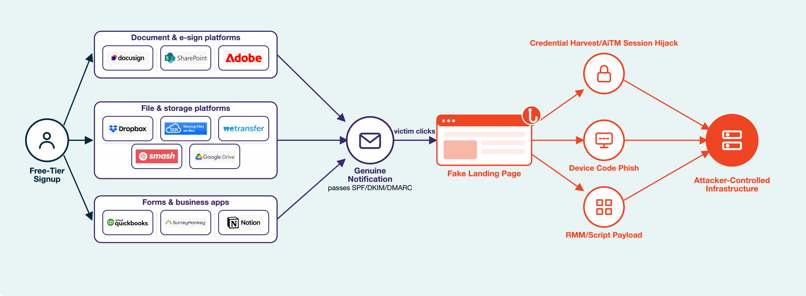
How Attackers Set It Up: Free-Tier Abuse Mechanics
Setting up this attack costs little to nothing. Most platforms on this list offer a free tier, and the rest offer a free trial. Either way, registration takes only a few minutes.
The attacker's malicious content sits at the end of a redirect chain. The email is clean because the platform sent it. That's why this attack slips past the controls that check sender authenticity, such as SPF, DKIM and DMARC.
SEG allow-list exploitation makes the problem worse. Many organizations add high-volume transactional senders, such as these SaaS platforms to an explicit allow list so business-critical notifications don't land in spam. When an attacker abuses one of these free tiers to send a phishing notification, it passes through the allow list like a legitimate business document. The attacker pays nothing, registers an account in minutes and gets a fast lane to the inbox.
What Happens After the Click
Upon navigating to the final destination of the redirect sequence, the compromise unfolds via one of three distinct operational pathways.
1. Credential Harvesting
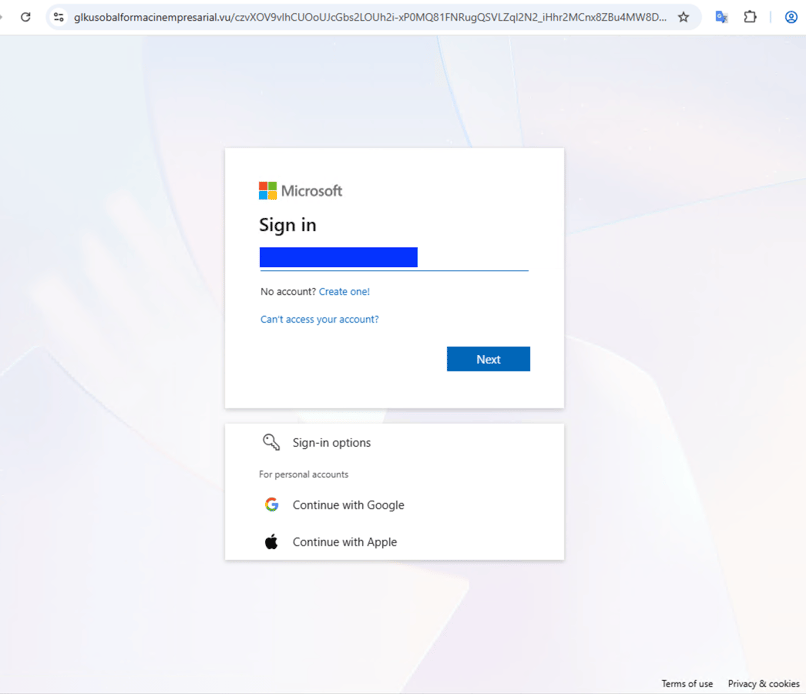
Attackers employ fake login pages to steal user credentials directly, often combining them with Adversary-in-the-Middle (AiTM) phishing proxies that intercept authentication traffic in real time. By relaying requests to legitimate identity providers, AiTM proxies capture live session cookies alongside credentials, effectively bypassing standard multi-factor authentication (MFA) controls unless phishing-resistant methods, such as FIDO2 hardware keys, are enforced.
2. Device Code Phishing
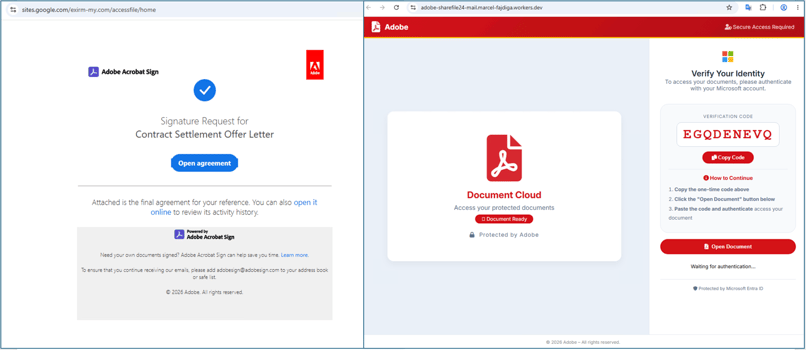
These campaigns skip credential harvesting altogether and abuse the OAuth device-authorization flow instead, the same flow built for devices without a browser. The attacker starts a device-code request against the real identity provider, then sends the victim a message asking them to open an agreement from Adobe using Acrobat reader and enter a short code to authenticate/verify the identity. The victim authenticates normally, on the real site, completing their own MFA challenge in the process. What they hand the attacker isn't a password. It's a live, already-authenticated session token, polled straight out of the real login flow.
3. RMM Deployment
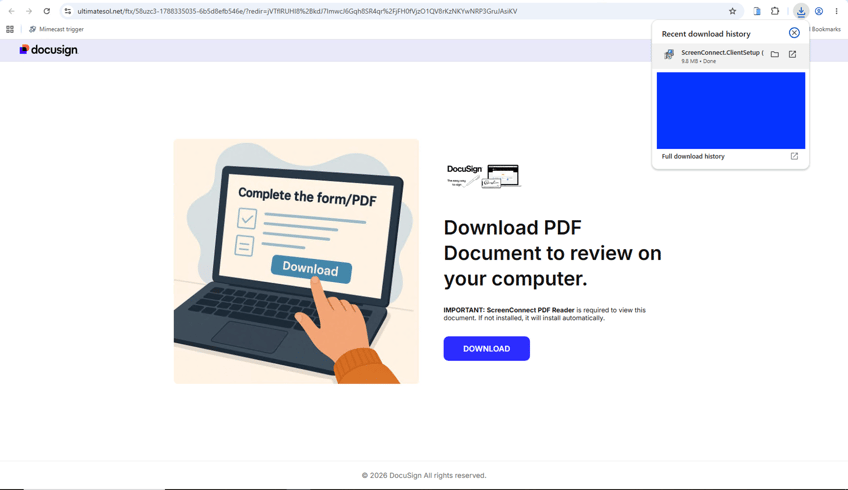
Attackers also prefer to trick the victim into downloading an installer script for a legitimate Remote Monitoring and Management (RMM) tool, such as ScreenConnect, AnyDesk or Atera. The phishing page poses as a required document reader or viewer necessary to open the file. Because these are legitimate, digitally signed administrative software used by IT teams and MSPs, antivirus and endpoint detection products rarely flag them. Once installed, the attacker gains full hands-on-keyboard access to the endpoint, establishing a direct foothold for lateral movement.
Same Playbook, Different Platforms
The compromise mechanism is nearly identical across the platforms covered in this report: a free signup, a genuine notification and a redirect that only the attacker controls. What changes from one campaign to the next is just the brand name on the email.
The table below shows the most observed lure themes across the SaaS platforms attackers abuse most, along with the sender each one uses.
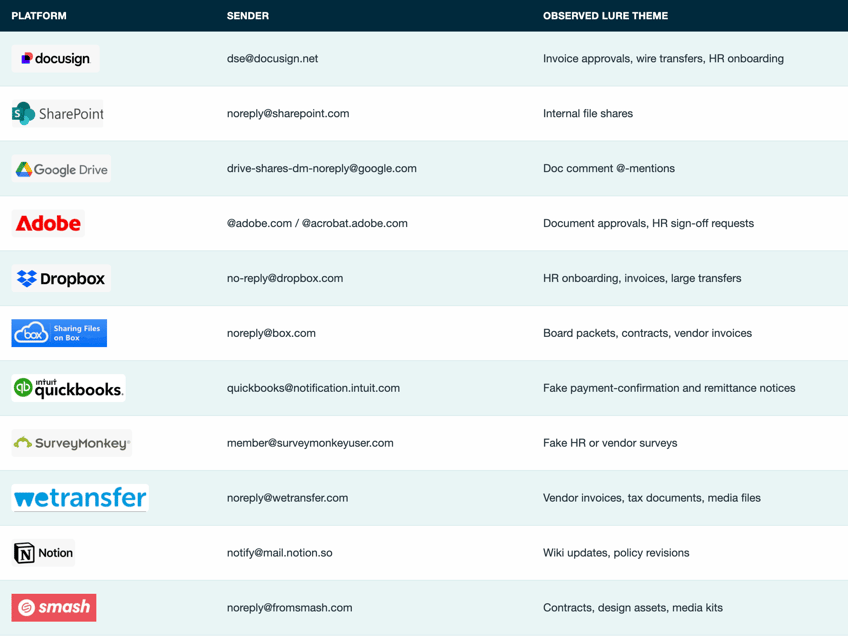
Document-sharing platforms carry the highest risk, not because the attacks are sophisticated, but because of how much organizations trust them. These notification themed emails routinely sit on an organization's SEG allow lists, which makes inbox delivery highly likely for any notification either platform generates, regardless of who triggered it. Here's a closer look at most observed lures from the majorly abused SaaS platforms.
DocuSign
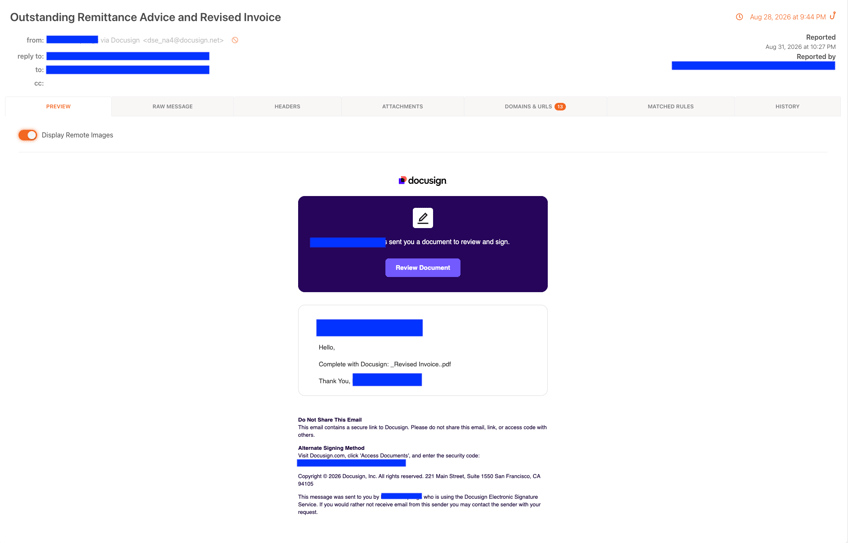
DocuSign was the highest-volume LOTS vector from June to August 2026, showing steady monthly growth. Trivial free-tier registration lets attackers leverage finance and HR lures with high urgency. Buttons like "Review Document" or "Sign Now" exit DocuSign to fake Microsoft or Google logins, using credential harvesters or AiTM proxies to steal credentials and session tokens.
QuickBooks
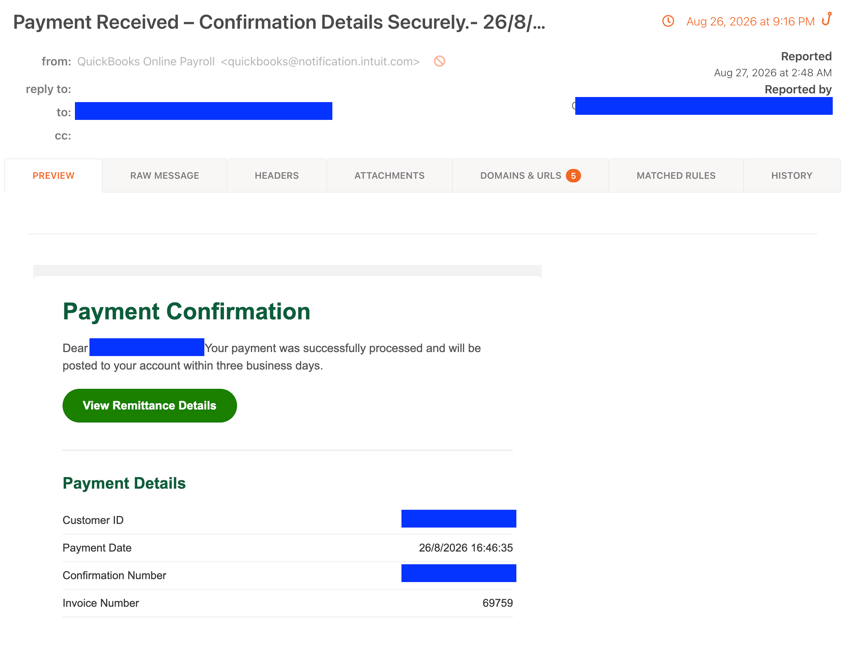
These typically impersonate payment confirmations with links leading to attacker-controlled infrastructure. Unlike DocuSign's steady growth, QuickBooks volume peaked early before dropping and partially recovering, indicating a concentrated campaign burst rather than sustained growth.
Google Drive
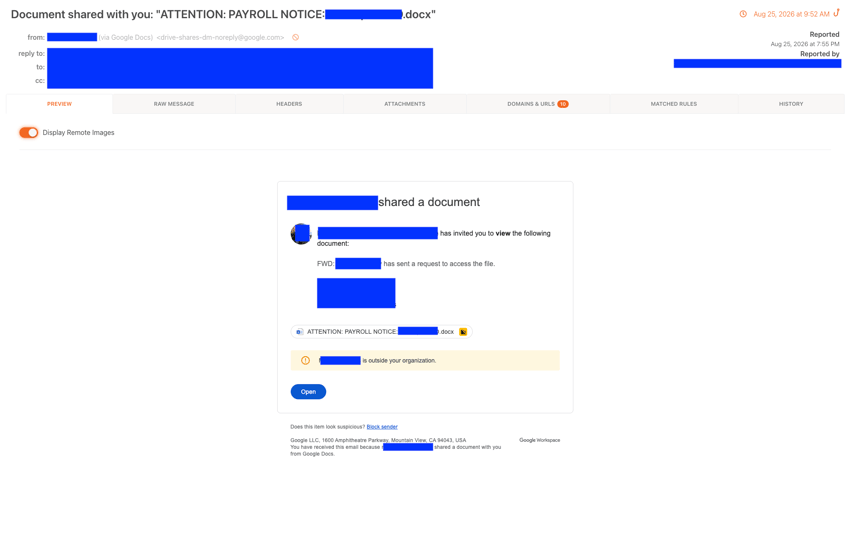
Google Drive comment notifications are a subtler variant. Attackers share a Google Doc with the victim, then post a comment that @-mentions them. Google sends a comment-notification email. The comment contains a link that Google doesn't validate or restrict, and that link points directly to a harvester. The attacker's infrastructure ends up embedded in content Google generated and delivered, from a Google email address, with Google's own authentication headers.
Adobe
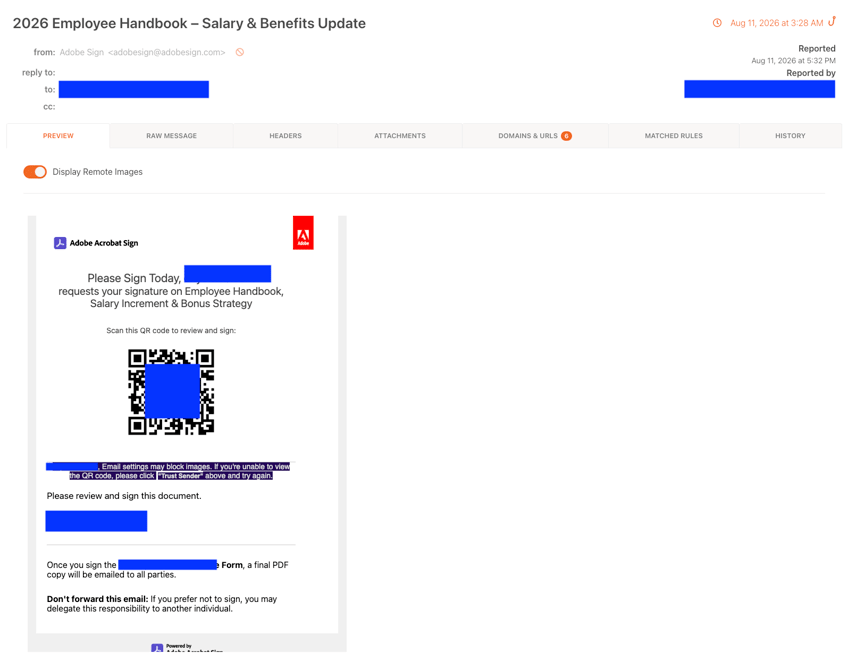
Adobe Sign and Acrobat lures can prove highly convincing to employees. Attackers exploit native Adobe tools because trusted domains bypass SEG filters. Approval workflows, HR files and sign-off requests leverage brand familiarity and urgency to drive victims toward logins, HTML attachments or QR codes. Additionally, Adobe abuse volume grew faster than any tracked platform, more than doubling over three months.
Other Platforms in the Mix
Seven other platforms account for a much smaller share of incidents but follow the same core pattern: a genuine notification from a trusted domain, with the actual harm one click away.
- SharePoint: Impersonates an internal file share at Microsoft 365 organizations, then redirects through Microsoft's own URL-shortening infrastructure to attacker infrastructure
- Dropbox and Box: Host a malicious payload/document with a second link to a fake Microsoft 365 or single sign-on (SSO) login page
- SurveyMonkey: Spoofs the display name on a genuine survey invitation to redirect victims to attacker Infrastructure
- WeTransfer : Delivers weaponized ZIP or PDF payloads instead of a fake login page
- Notion: Hosts convincing landing pages directly on legitimate notion.site subdomains
- Smash: Uses branded, time-pressured download pages to rush victims past inspection
The message is simple: a legitimate sender does not mean legitimate content. A notification from a platform you recognize is not a signal of safety. Increasingly, it's a signal of a well-built attack. When you get an unexpected document request, invoice or file share, whether or not you recognize the sender, verify it through a channel you already trust: call the sender, log in to the platform directly or contact IT. Don't click "Sign," enter credentials or scan a QR code in response to an email you weren't expecting, no matter how legitimate the sender looks.
What Can Security Teams Do to Defend Against This?
The controls that stop commodity phishing don't do much here, since nothing in this attack chain is technically malicious until the final redirect resolves. A few things do work:
- Deploy behavior-based email security. A genuine notification from a trusted domain gives signature and reputation checks nothing to flag. Behavioral email security analyzes patterns across mail flow instead, flagging urgency, mismatched context or a notification that doesn't fit how the sender normally behaves.
- Audit SEG and mail-flow allow lists regularly. If a high-volume transactional sender such as @docusign.net or @sharepoint.com sits on an explicit allow list, confirm it's still needed and scope it as narrowly as possible instead of allow-listing the whole domain.
- Restrict or monitor OAuth device-code grants. If your identity provider supports it, disable the device-authorization flow for accounts that don't need it, and alert on device-code logins from unfamiliar IP ranges or in rapid succession.
- Flag first-time RMM installs, not just unsigned binaries. ScreenConnect, AnyDesk and similar tools are usually allowed by default because IT and MSPs use them too. Alert on a first-time install on an endpoint with no existing MSP relationship, rather than trusting the signature alone.
How Can Users Spot Service Lure Phishing Emails?
Users should keep an eye out for these signs to help catch service lures phishing emails before the click.- Watch for urgency. Phrases requesting to sign/review within a mentioned time frame or payment failure notification.
- Hover before you click. If the button's destination domain doesn't match the platform that sent the email, stop.
- Question the timing. A surprise invoice, signature request or payment confirmation is worth a second look, even from a platform you already use.
-
Log in directly instead of clicking through the link. If the document or payment is real, it's waiting for you on the platform itself.
- Report it. Reporting a suspicious email to IT or using the Phish Alert Button costs nothing and helps catch the next one faster.
Where KnowBe4 Can Help
Every platform covered in this report gets abused the same way: a genuine notification from a genuine sender, with nothing malicious until the redirect chain resolves. That's exactly the layer KnowBe4 is built to catch.
KnowBe4 Defend: Real-Time Behavioral AI
None of these lures need a malicious attachment because that's the whole point of routing through a trusted platform. KnowBe4 Defend doesn't wait for a payload to show up, because in this attack class, one never does.
Behavioral AI and natural language processing analyze inbound mail-flow patterns for the signals that give social engineering away: urgency, mismatched context, a notification that doesn't fit how the sender normally behaves, not for file signatures or known-bad domains. An abused DocuSign or QuickBooks email that’s clean at every technical layer can look legitimate. That's exactly the gap Defend is built to catch. It analyzes behavioral and language patterns across mail flow, catching what a single read never notice.
Context-Aware Warning Banners
Defend adds a warning banner directly into the email before the recipient opens it. This interrupts the illusion of legitimacy at the one moment that matters most in this attack chain: before the click and before the redirect through Google or Microsoft's own infrastructure even begins.
For real-time updates and ongoing PHISHING threat intelligence, follow the KnowBe4 ThreatLabs on X:@Kb4Threatlabs