 Lead Analysts: Jeewan Singh Jalal and Prabhakaran Ravichandhiran
As reported in the latest Phishing Threat Trends Report (Vol. 7), attackers are increasingly using calendar invites to bypass traditional email defenses, with this vector surging 49% over the past six months. In this Threat Labs deep dive, our team goes behind the scenes to provide a detailed analysis of this escalating campaign. We break down the technical underpinnings and tactical shifts in a unique multi-vector attack that turns your trusted corporate schedule into an instrument of compromise.
While the industry has spent decades hardening the inbox, the calendar has remained a trusted space where we coordinate our professional lives. Attackers are now ruthlessly exploiting this psychological blind spot to guarantee a return on investment for their social engineering efforts.
Campaign Summary
- Vector and type: Calendar Invite Phishing
- Techniques: Social Engineering, Credential Harvesting, Vishing, RMM Agent Delivery
- Bypassed SEG detection: Yes (via uninspected .ics files and auto-acceptance)
- Targets: Organizations and their employees globally
Why Attack Calendars?
Modern phishing has transcended simple email delivery. Today’s attackers understand that a meeting notification carries more weight and creates more urgency than a standard email. This tactic is driven by Platform Trust Exploitation. Individuals are conditioned to view notifications from Zoom, Microsoft Teams, or Google Calendar as native system alerts, and because of this conditioning everyone rarely applies the same level of scrutiny to an invite compared to a suspicious email.
This misplaced trust can be weaponized through Default Vulnerabilities in collaboration platforms. Many systems are configured to “automatically add invitations” to calendars by default. This technical loophole allows a malicious .ics file to populate a user’s schedule even if the delivery email is filtered out or never opened.
The final component is tactical timing, a phenomenon our researchers call the “End-of-Day Blur.” Our data shows a distinct surge in these attacks starting after lunch and peaking at 5:00 p.m. Threat actors are deliberately timing these campaigns to hit when cognitive load is at its highest, catching employees at the exact moment their guards might be lowest as they wrap up their workdays.
|
The Element |
The Threat Actor’s Leverage |
|
Platform Trust Exploitation |
Exploits the “Authority Bias,” where users mistake third-party notifications for legitimate, internal system alerts. |
|
Default Vulnerabilities |
Leverages “Auto-Accept” settings to bypass Secure Email Gateways (SEGs) and land directly on synced devices. |
|
End-of-Day Blur |
Targets decision fatigue by launching campaigns during the 4:00 p.m. and 5:00 p.m. window |
Analysis of Identified Attack Vectors
Our threat researchers have revealed four distinct methods currently being used in this campaign:
Vector 1: The Payment Lure (Vishing Gateway)
Attackers distribute .ics files that masquerade as urgent subscription renewals or payment notifications. These invites often include fraudulent contact numbers, aiming to drive victims into a vishing (voice phishing) attack where they are coerced into revealing financial details.
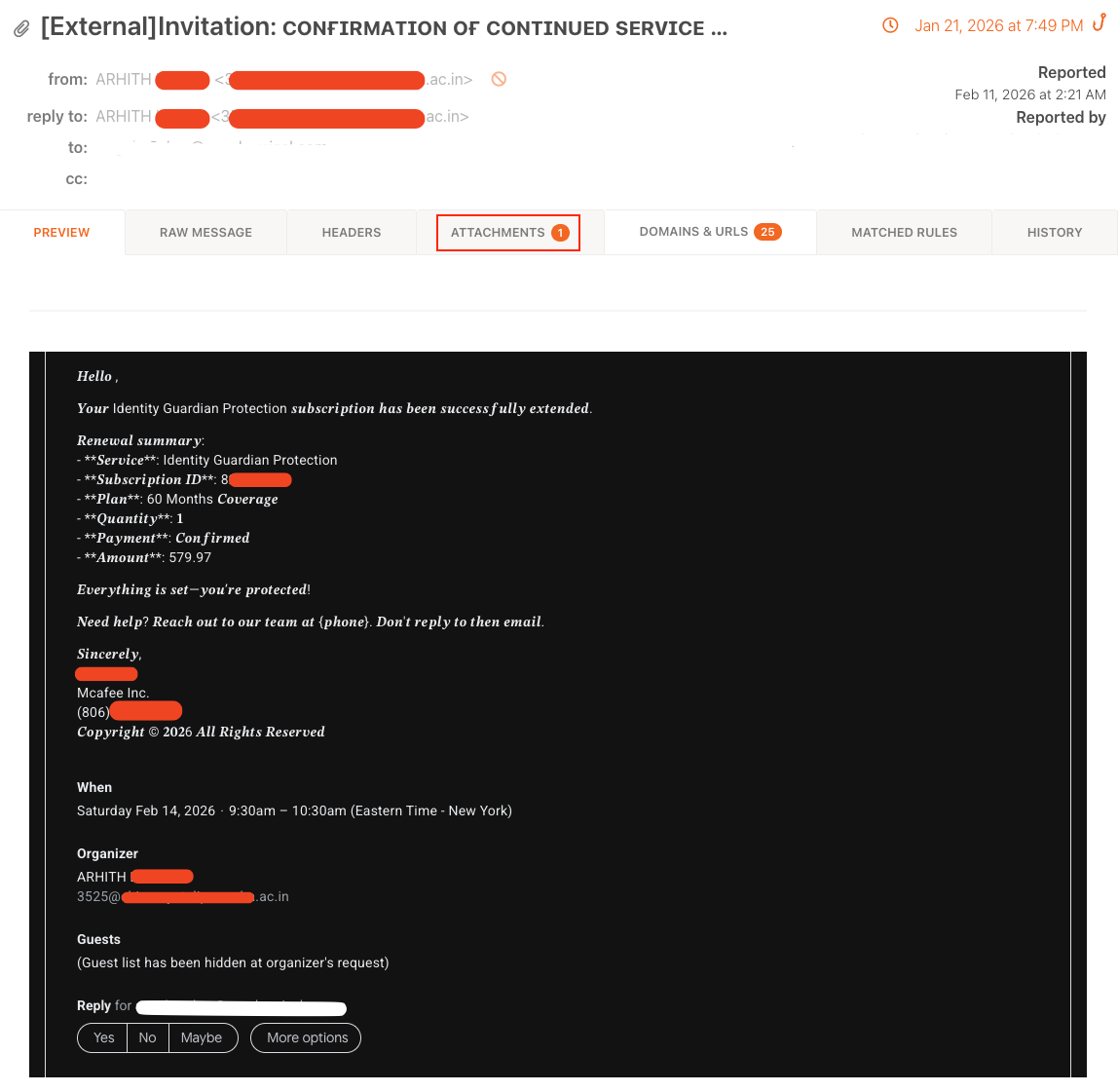
Malicious ICS file with payment lure details
Vector 2: The Fake Zoom Update (RMM agent Delivery)
In this scenario, users receive a professional-looking Zoom notification. Clicking the "Join" link leads to a landing page that plays a static sound and claims your Zoom version is outdated. This triggers the download of a file like ZOOM-UPDATE-INSTALLER.msi, which is actually a RMM (Remote Monitoring and Management) agent that grants attackers silent, persistent access to your system.
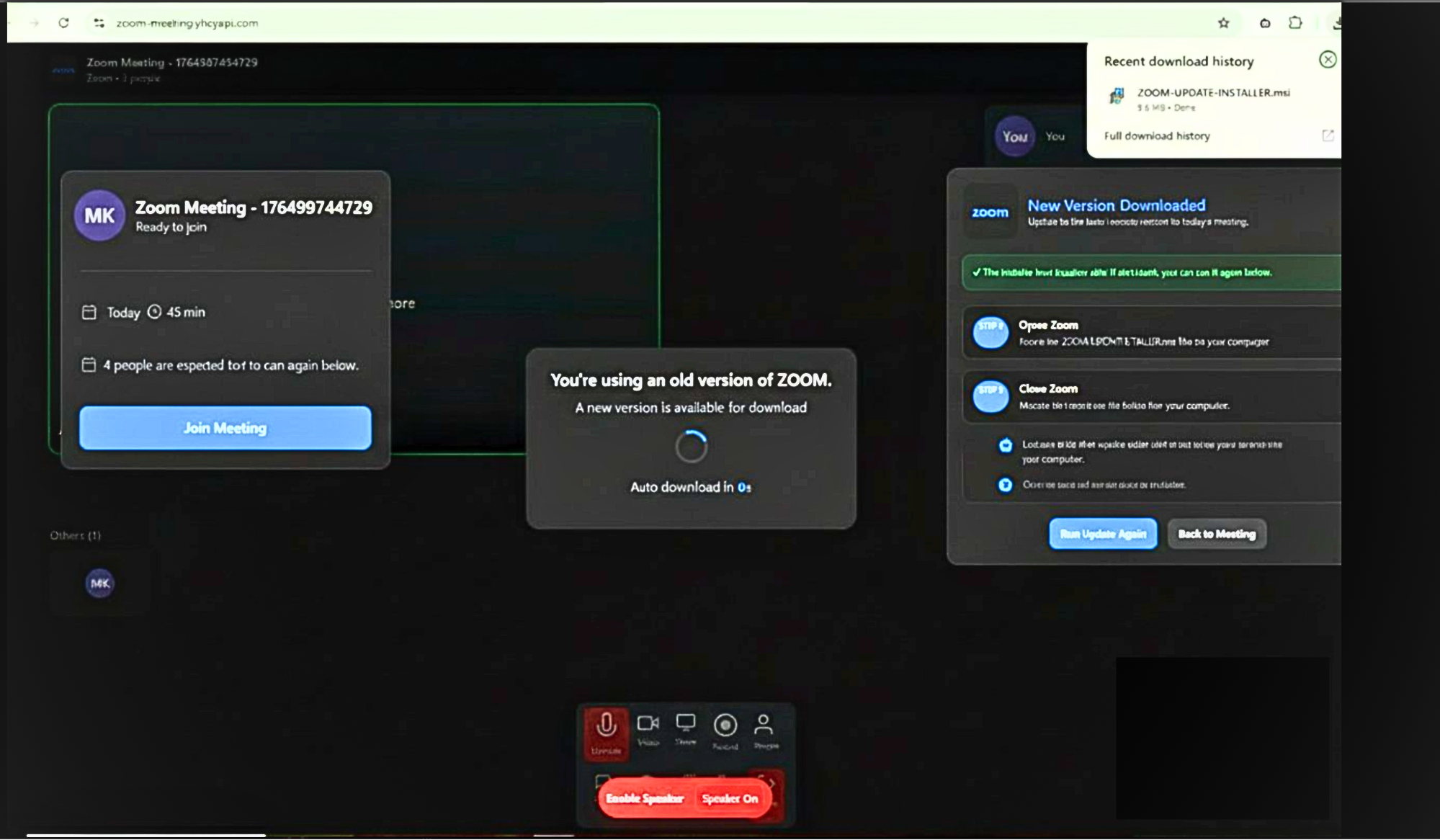 Screenshot of a deceptive Zoom "Update Available" landing page
Vector 3: Platform Impersonation (Credential Harvesting)
This vector uses compromised accounts or lookalike domains to send branded invitations for Zoom or Google Meet. Victims click through multiple redirect layers, often including a "human verification" step like Cloudflare Turnstile, to reach a sophisticated phishing page designed to steal their platform credentials.
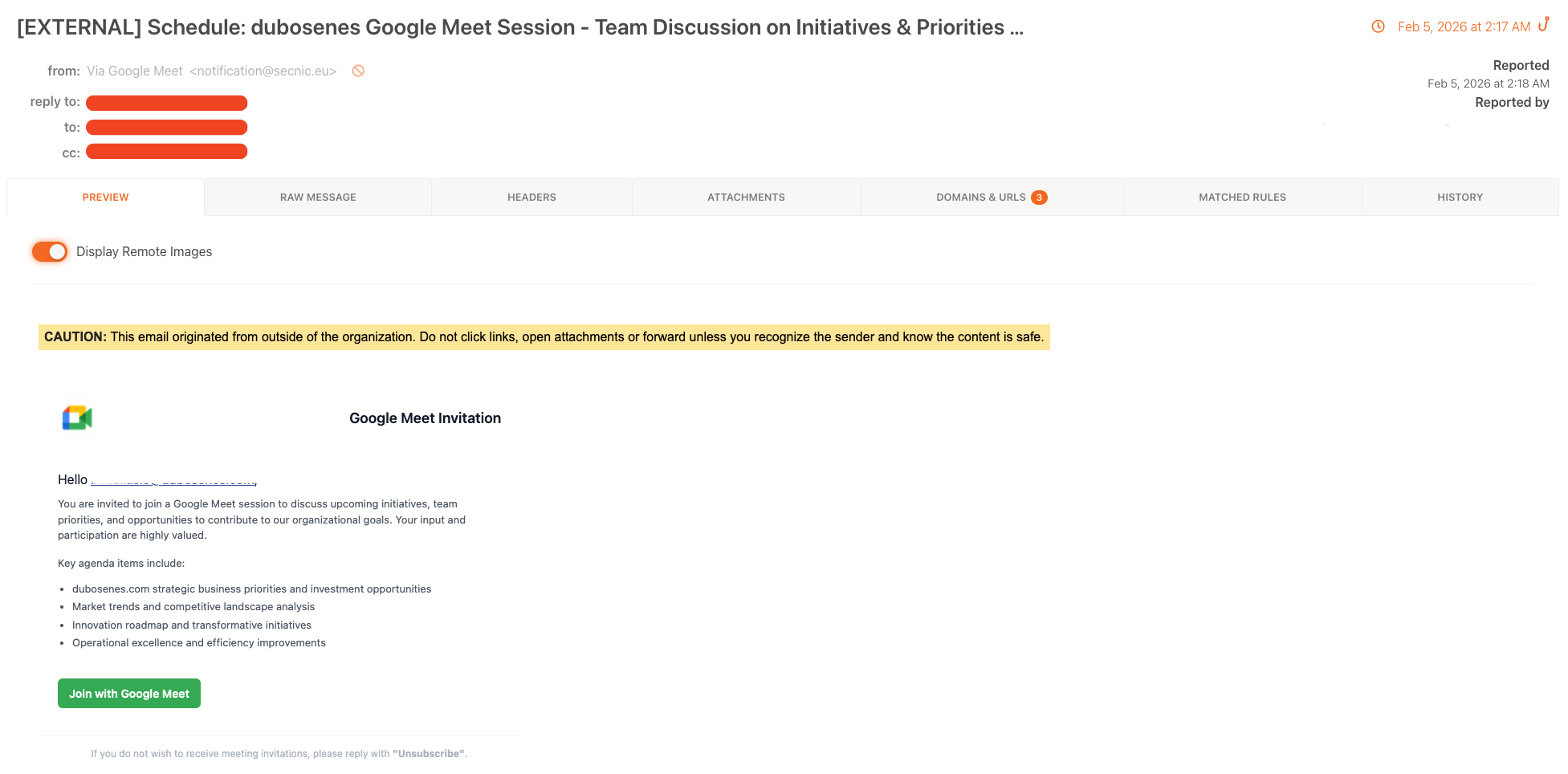
Real-world example of a phishing email disguised as a Google Meet Invitation
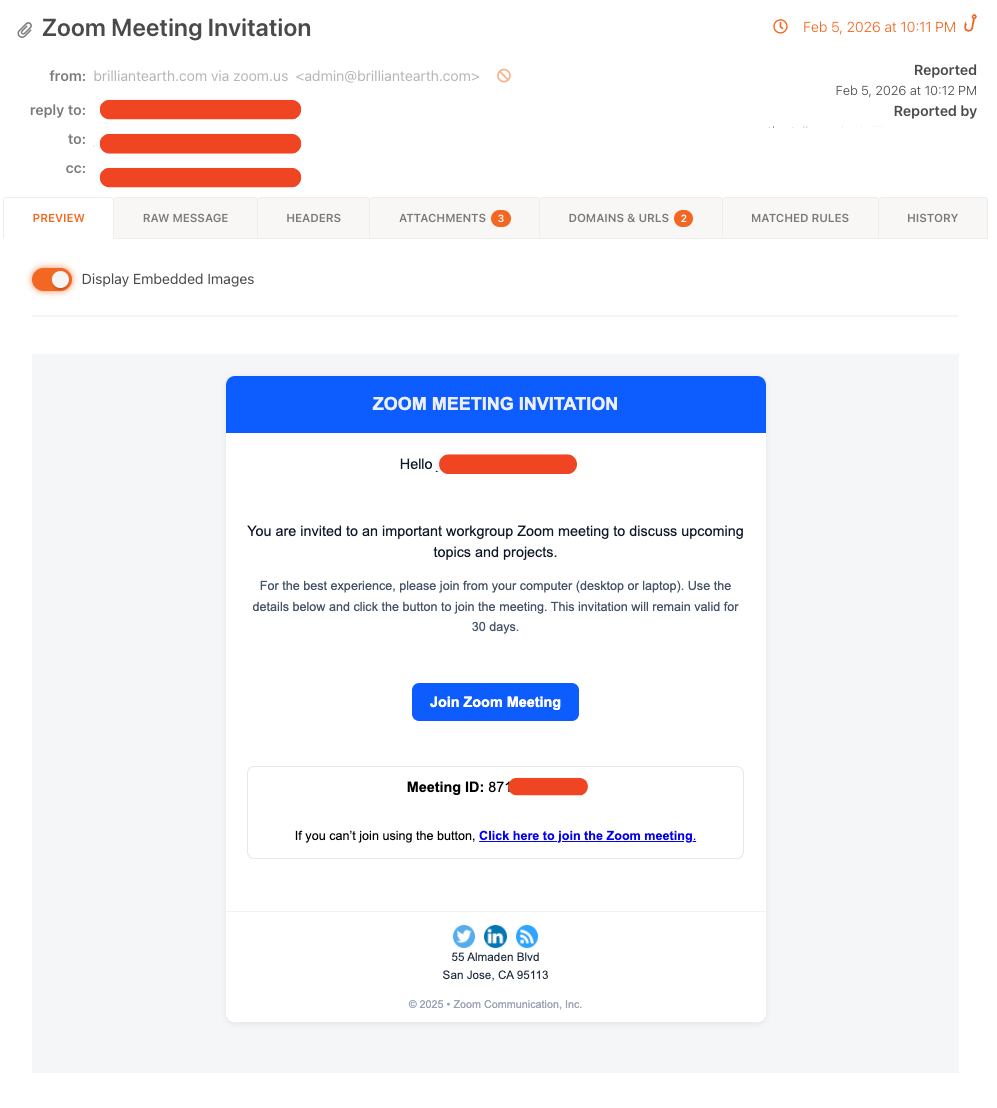
Real-world example of a phishing email disguised as a Zoom Meeting invite
Vector 4: Internal Company Impersonation
Attackers target Microsoft 365 environments by embedding malicious links directly into the metadata (description or location fields) of .ics files. Because many systems are set to auto-accept internal invites, these malicious events can populate a user's calendar without any initial interaction, waiting for the moment they click "Join".
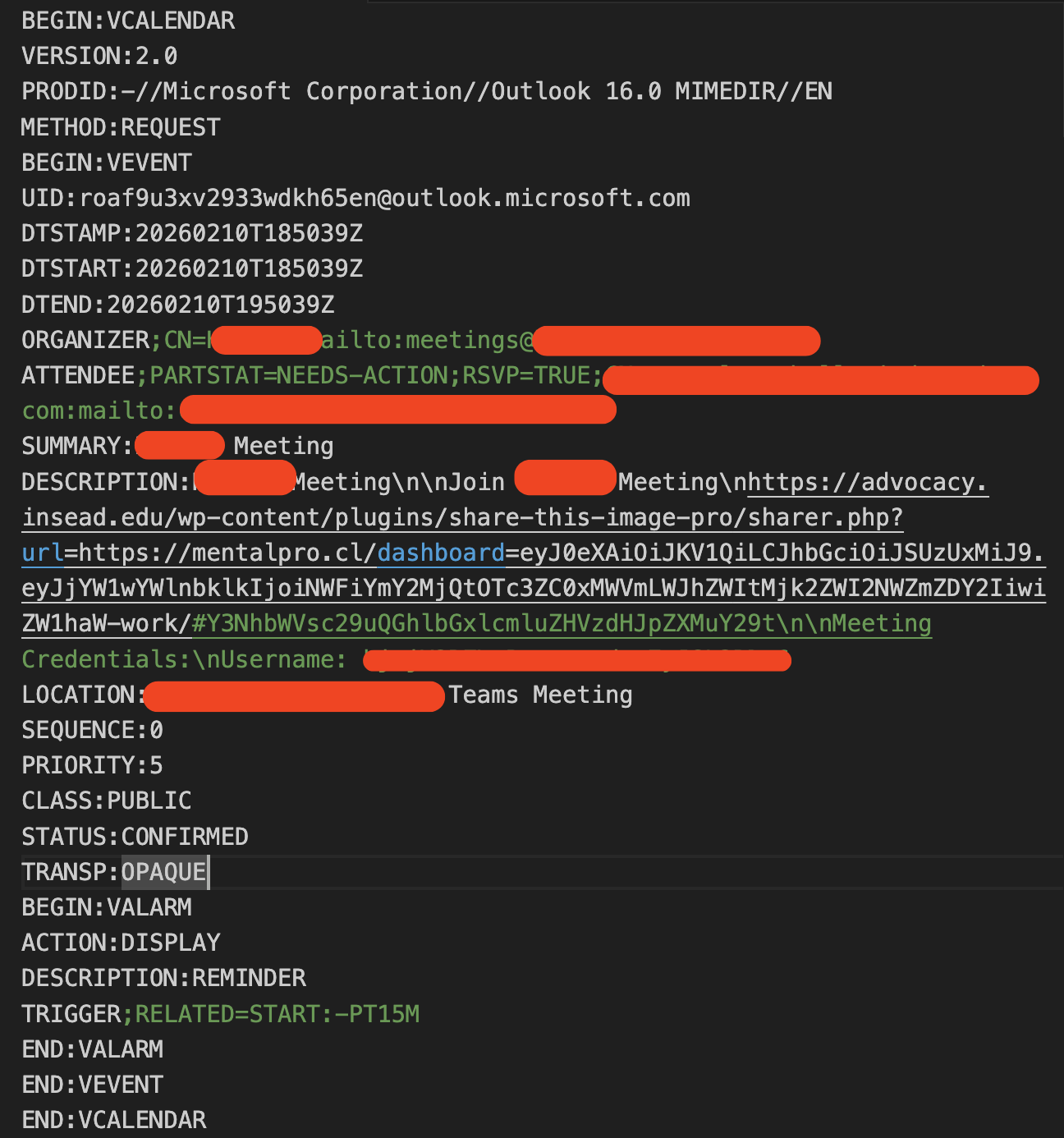 Example of how attackers embed malicious links into the metadata of .ics files
The Lifecycle of a Calendar Breach
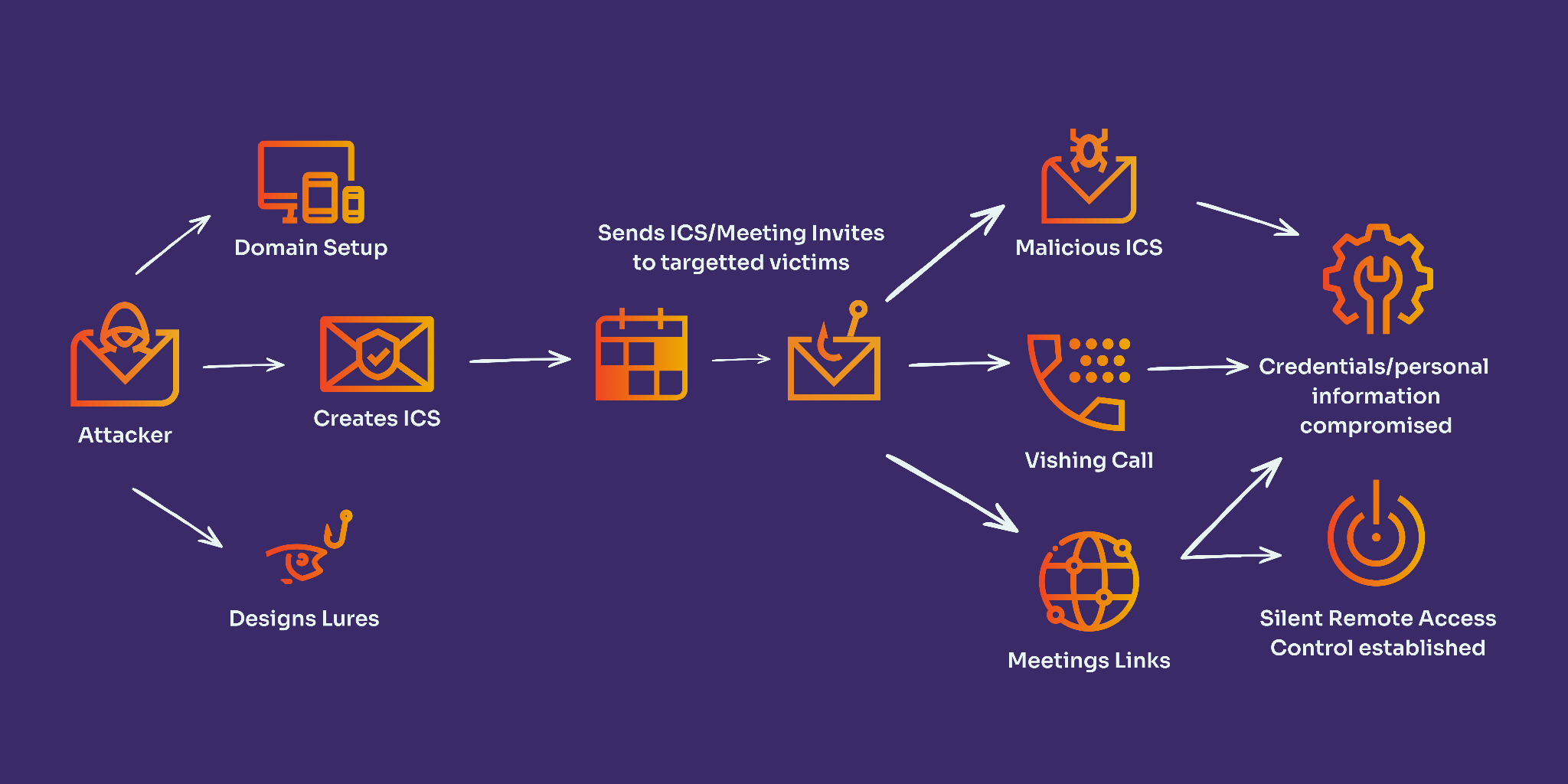
The effectiveness of calendar injection lies in its ability to bypass the “front door” of the inbox, creating a streamlined path from delivery to exploitation. Our threat researchers identified a three-stage progression:
- Silent Delivery - The attack begins when a malicious .ics file is distributed via email or shared through a compromised internal account. Because these files are often auto-processed by collaboration suites, they bypass the primary inbox and land directly on the user’s calendar. This initial entry is frequently invisible to legacy Secure Email Gateways (SEGs), which fail to inspect the deep metadata within the invite.
- Trusted Staging - Once the event is established on the schedule, the victim is notified via a native system pop-up on their desktop or mobile device. This notification carries the weight of a trusted system alert. The staging phase concludes when the victim, acting under the pressure of a scheduled meeting, interacts with the malicious link or dials the fraudulent “support” numbers embedded in the event description.
- Direct Exploitation - The final phase depends on the specific vector. In credential harvesting scenarios, the victim is led through an Adversary-in-The-Middle (AiTM) proxy to a spoofed login page. In more advanced campaigns, clicking the “Join” link triggers the silent download of a Remote Monitoring and Management (RMM) agent. Alternatively, in vishing-based lures, the victim is connected to a fraudulent agent who uses high-pressure social engineering to coerce them into revealing sensitive financial data or system access.
|
Stage |
Technical Objective |
The Security Gap |
|
Delivery |
Inbox Bypass |
Legacy SEGs often fail to inspect .ics file metadata |
|
Staging |
Psychological Authority |
Native system notifications bypass “External Sender” banners |
|
Exploitation |
Resource Access |
Attackers pivot to credential theft or persistent RMM backdoors |
Product Spotlight: Stop Threats Where They Start
Legacy Secure Email Gateways (SEGs) miss 91% of modern threats because they were built for a world of simple email, not complex collaboration. To secure the digital workforce, organizations need a defense that understands context and behavior.
KnowBe4’s PhishER Plus and Collaboration Security provide a critical safety layer using the following technologies:
- PhishER Plus: Real-Time Threat Elimination. Leveraging the power of over 10 million “human sensors” globally, PhishER Plus identifies malicious calendar invites in real-time. Once a threat is confirmed, the platform can automatically “Rip and Flip” – removing the malicious invite from every synced calendar and transforming it into a de-fanged simulation.
- AIDA-Powered Detection: Our Artificial Intelligence Defense Agents (AIDA) use 15 years of behavioral data to identify the subtle anomalies of a calendar injection attack that legacy filters miss.
- Security Awareness Training (SAT) platform: Security controls adjust dynamically based on a user’s unique Risk Score, delivering Just-in-Time Coaching when they need it most.
Strategic Recommendations for Defense
Organizations must treat their calendar systems as a critical attack vector. We recommend the following technical and policy controls to secure the digital workforce.
- Enhance Calendar Security: Configure email gateways to inspect .ics files for malicious URLs and unusual data structures.
- Implement Link Sandboxing: Use security tools that scan and detonate links within calendar event details and locations at the time of click, not just at delivery.
- Strict Sender Verification: Enforce SPF, DKIM, and DMARC policies and ensure the calendar app clearly labels invites from external or unverified senders
- Limit Auto-Acceptance: Disable the automatic processing of meeting invites from outside your organization to ensure malicious events don’t stay put on synced devices.
- Risk-First Awareness Training: Update your training modules to specifically include examples of calendar-based phishing attacks, teaching users to scrutinize meeting requests as carefully as they do emails.
Indicators of Compromise (IOCs)
The threat landscape evolves rapidly. For the most current list of domains, hashes, and behavioral signatures related to this campaign, please refer to the latest intelligence update from KnowBe4 Threat Labs.
For real-time updates and ongoing threat intelligence or to view the full IOC list, follow the KnowBe4 Threat Lab analysts on X: @Kb4Threatlabs