Lead Analysts: Prabhakaran Ravichandhiran, Jeewan Singh Jalal
An employee at your company receives an email from hr@yourcompany.com. The domain matches. There is no warning banner. The message asks them to review a payment approval document. They click.
That email was never sent by your HR team. An attacker sent it, and your own Microsoft email infrastructure delivered it, with no password and no credentials required.
How Direct Send Works
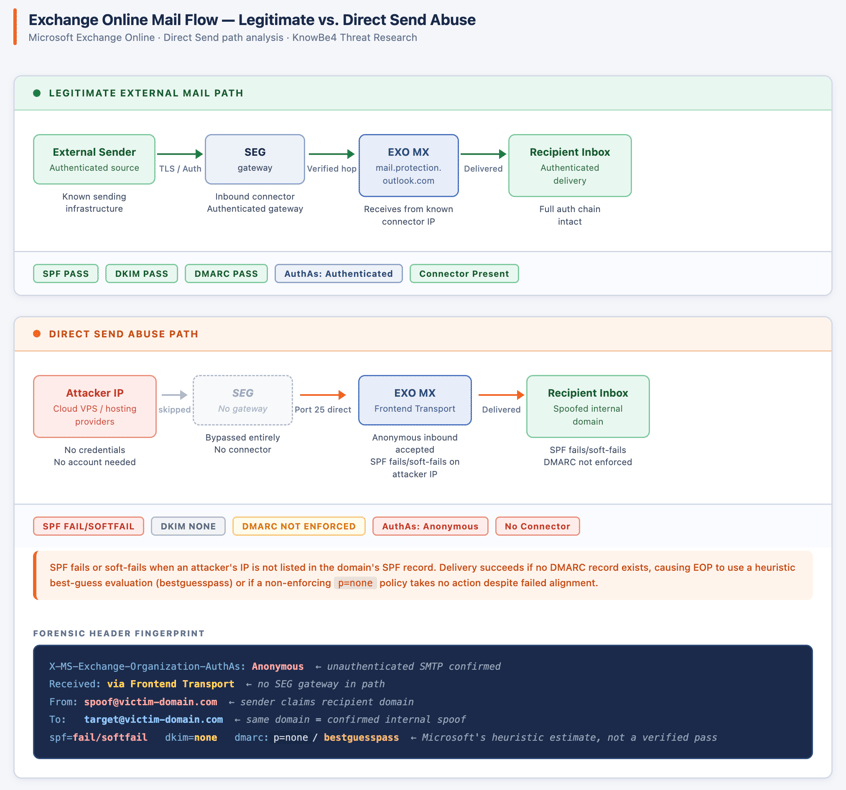
Microsoft 365 includes a built-in delivery path called Direct Send. It was designed for a practical, unglamorous purpose: letting office printers, scanners and legacy on-premises applications send email without needing a dedicated account and also bypassing security gateways. To support that, Exchange Online keeps a publicly accessible mail entry point open by default.
Attackers have found that this path works just as well for them. By connecting to that same open endpoint, they can send an email claiming to be from anyone at your organization’s HR, accounting, admin or your CEO. The email arrives looking like it came from an internal address, because technically, it entered through your own infrastructure.
Your email security checks notice something is off. The sending source does not match the claimed sender. They log it. But in most organizations, the DMARC policy is set to monitoring mode, meaning the mismatch is recorded and the email is delivered anyway. The attacker counted on exactly that.
What KnowBe4 Threat Labs Observed: July – August 2026
KnowBe4 Threat Labs tracked Direct Send abuse across two months, isolating emails that carried the forensic fingerprint of this delivery path and where the claimed sender domain matched the target organization's own domain.
The scale of what we found:
- 29,785 confirmed Direct Send spoofs across July and August
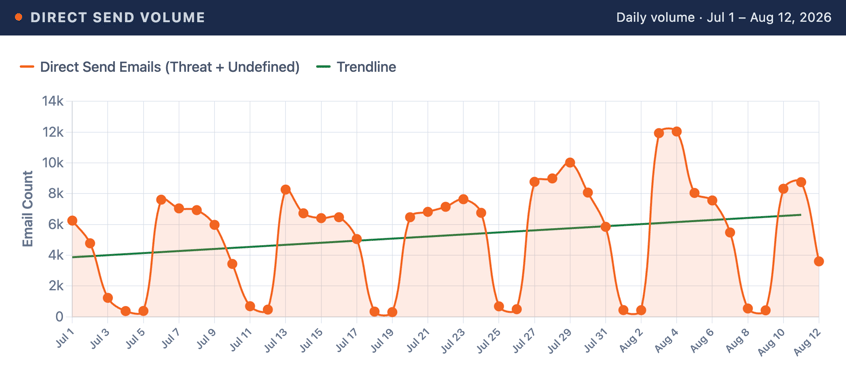
- Weekday volumes: 22,000 – 32,000 emails per week. Weekends dropped to 1,500 – 2,000, a deliberate mirror of normal business hours, not automated spam indifferent to the calendar
- August 3 and 4 each exceeded 20,000 emails in a single day, the highest spike in the dataset
- One email in August reached 900 recipients in a single send, enough to land in every inbox at many mid-size organizations at once
- 4,023 spoofs used a reply-to address pointing to a different domain. Victim replies go to the attacker, not to a real internal colleague
- Around 35% of emails carried attachments. Virtually all were classified as threats
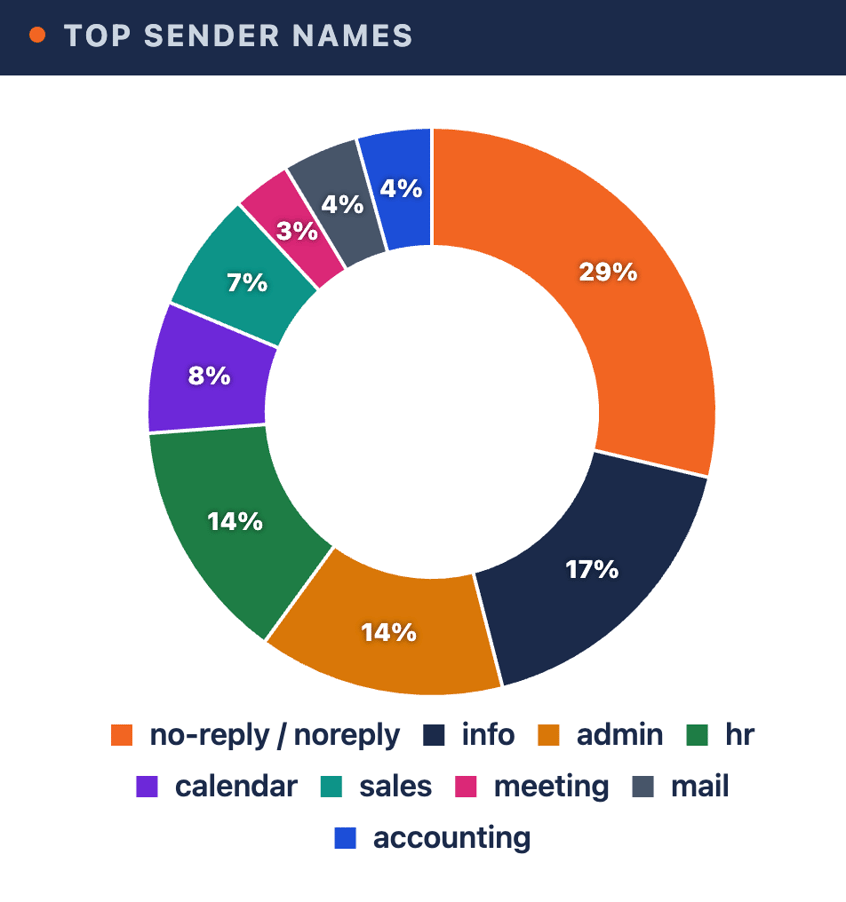
The sender names were chosen deliberately. The most common across both months: “hr,” “admin,” “no-reply,” “accounting” and “meeting.” That last one is telling;routine calendar traffic rarely triggers suspicion, which is exactly why it works as an effective cover.
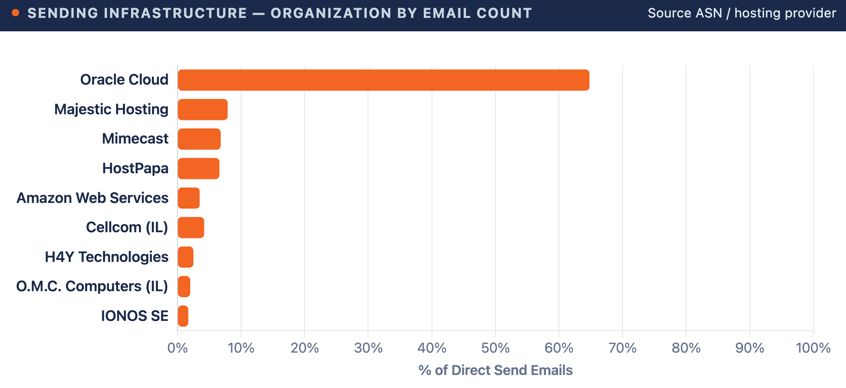
The sending infrastructure shifted across the observation window, indicating actors rotate cloud providers. Oracle Cloud accounted for the dominant share of Direct Send traffic by email volume.
What the Direct Send Attacks Looked Like
Four lure patterns dominated the dataset, each exploiting the trust that comes with an email appearing to arrive from inside the organization.
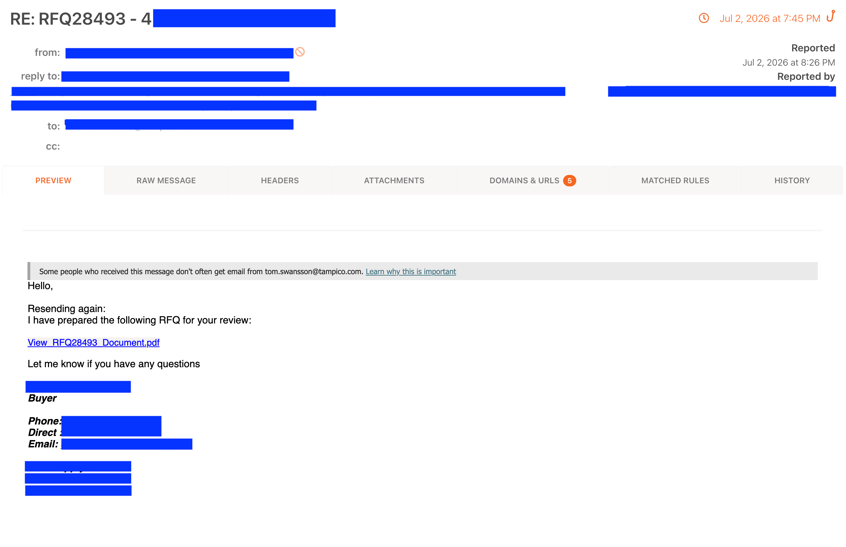
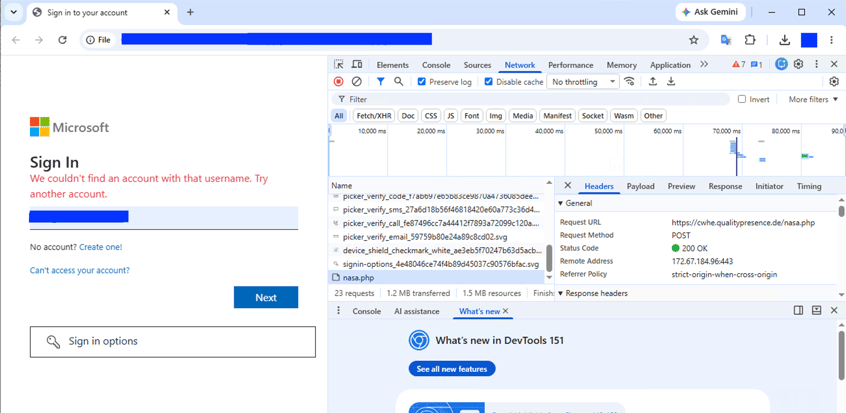
Fake document requests
Emails impersonating an internal procurement or finance request, asking the recipient to open an attached document. The attachment loads a fake Microsoft Sign-In page. Credentials entered go directly to the attacker.
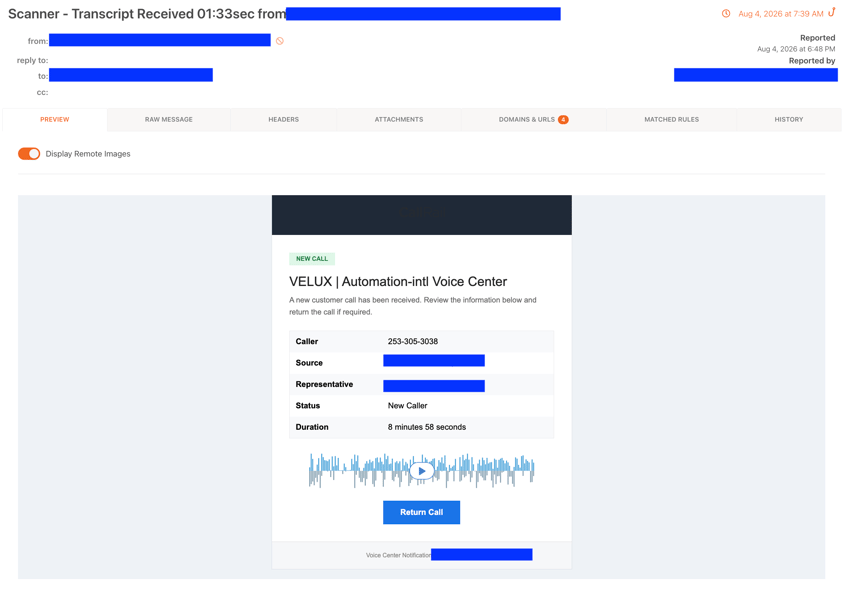
Internal voicemail alerts
A spoofed voicemail notification appears to come from an internal number, with a link or attachment pretending to contain the audio. The urgency of a missed internal call tends to override careful scrutiny.
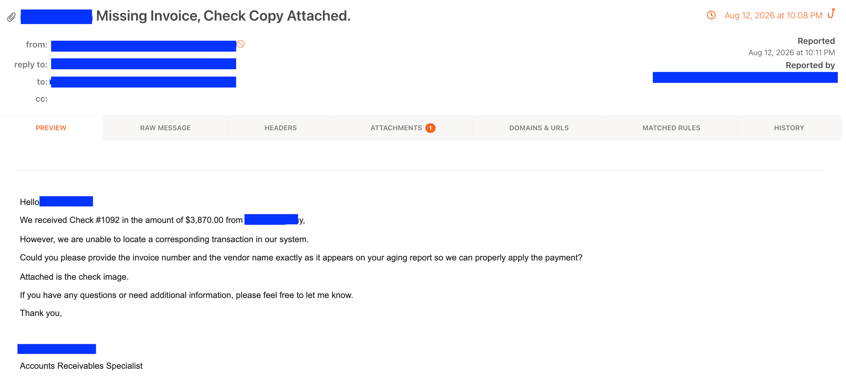
Invoice and payment approval chains
Business email compromise-style lures impersonating finance or accounting, requesting review of an attached invoice or payment remittance. Replies from victims route to attacker-controlled inboxes via the “reply-to” mismatch.
Fake file shares via OneDrive
A link pointing to a legitimate-looking Microsoft SharePoint URL delivers a Windows shortcut file (.url) that silently redirects to attacker-controlled infrastructure. The Microsoft-hosted URL in the email body clears standard link inspection; the redirect to the malicious destination happens after the click.
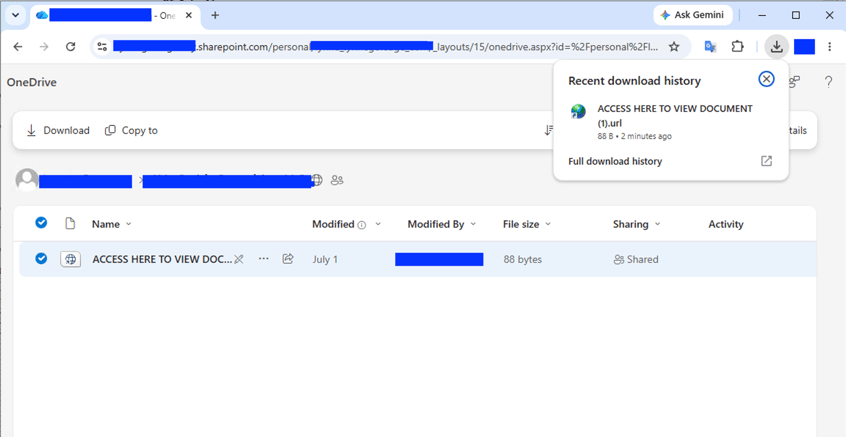
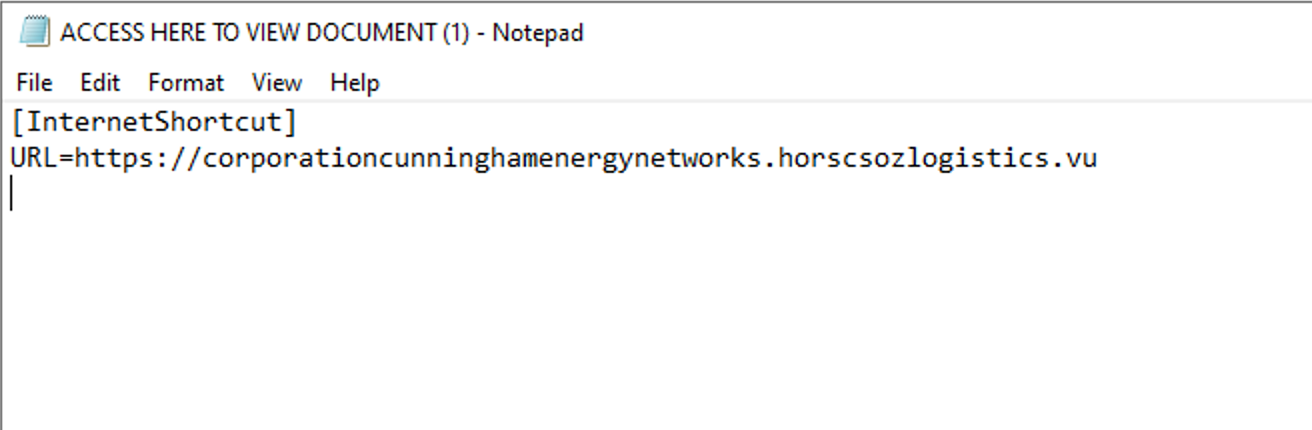
Figure 9. OneDrive staging page delivering .url shortcut file. Opening it silently redirects the browser to an attacker domain.
Why It Gets Through
Email authentication was built to catch exactly this kind of spoofing. And technically, it does the checks run, find the mismatch,and flag it. The problem is what happens next.
Most organizations running Microsoft 365 have their DMARC policy set to monitoring mode (p=none). This means: "notice the failure, but deliver the email anyway." It is the default starting point for DMARC deployment, and many organizations never move past it. The attacker's email arrives flagged internally and delivered to the inbox.
The second gap is structural. Exchange Online, by default, does not restrict which external IP addresses can deliver mail claiming to be from your own domain. Without an explicit configuration telling it otherwise, your mail system will accept a message from anywhere claiming to be hr@yourcompany.com.
What Happens When It Works
Take the fake document lure above: an employee enters their password on a fake Microsoft sign-in page, the page redirects, and nothing looks wrong. The attacker now holds valid mailbox access immediately if a session token gets relayed, or as soon as the next login if not.
Most attackers wait. They read sent mail and calendar invites to learn who approves payments and what a normal invoice looks like, then send one or hijack a reply chain timed to match. It now comes from a real, authenticated mailbox, so there’s no Direct Send fingerprint and no SPF failure to catch it. It reads as internal because it is.
If the wire gets approved, the money moves through a mule account within hours. What follows: a forensic review of everything the attacker touched, a breach notification check if the mailbox held personal data, credential resets across affected contacts and a call to the vendor whose name got used. This is illustrative, not a specific incident, but it’s the same shape most mature BEC cases take.
What to Do About It
None of the fixes below requires new tools or additional spend. They are configuration changes in your existing Microsoft 365 environment.
- Check and enforce your DMARC policy
If it is currently set to p=none, changing it to p=reject means spoofed messages claiming your domain are blocked before they reach the inbox. This is the single highest-impact change available. Through KnowBe4 Defend’s EasyDMARC integrations, admins get DMARC/SPF/DKIM visibility natively inside the email security workflow, instead of requiring a separate tool. - Lock down who can send as your domain
Exchange Online allows you to create an inbound connector that restricts which IP addresses can deliver mail claiming your domain. If your organization has printers, scanners or legacy applications that use Direct Send legitimately, identify those devices, create a connector scoped to their specific IP addresses and block everything else. - If you have no legitimate Direct Send devices, close the path entirely
A mail flow rule that rejects unauthenticated messages claiming your accepted domain shuts this delivery path down completely for organizations that do not need it. - Enable DKIM signing on outbound mail
DKIM adds a cryptographic signature to every email your domain sends. Recipients can verify the signature is genuine. Mail without this signature including Direct Send spoofs fails the check, giving your DMARC policy something concrete to act on.
The Clearest Signal to Hunt
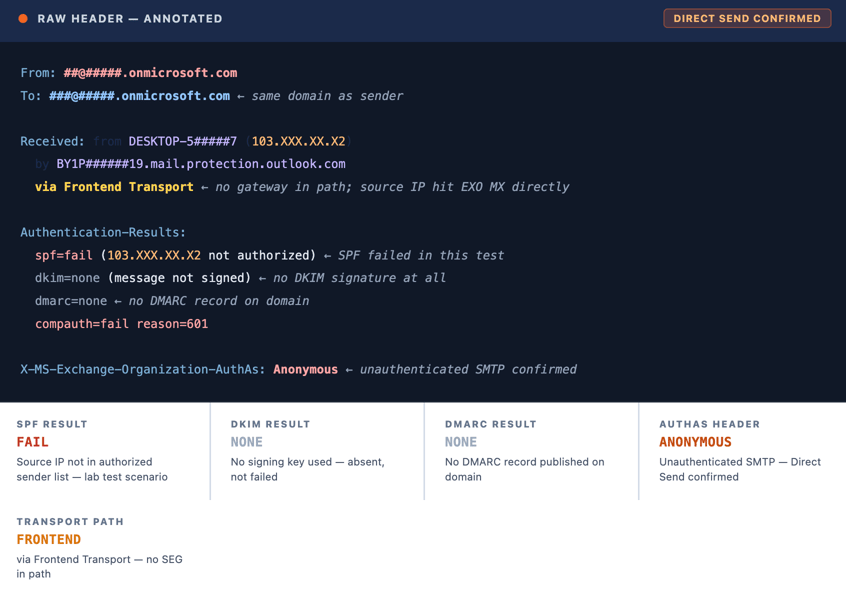
Every Direct Send email carries a header that Exchange stamps automatically: X-MS-Exchange-Organization-AuthAs: Anonymous. A message appearing to come from an internal address that also carries this header was not sent by that person. It arrived unauthenticated through an open delivery path.
Across 29,785 confirmed Direct Send spoofs over two months, role-based usernames including hr, admin, no-reply, and accounting appeared alongside lure subjects referencing payment remittances, voicemail notifications, wealth advisory inquiries, and missed calls. Users who are aware that a matching sender domain does not confirm the identity of the sender are better positioned to recognize these messages, particularly for requests involving payments, credential changes, or urgent action.
Where KnowBe4 Can Help
Native Microsoft 365 configurations often leave direct send pathways unmonitored. KnowBe4 Email and Collaboration Security closes these operational gaps by evaluating message context and metadata as emails land in the inbox.
As a Microsoft Defender ICES Vendor Ecosystem Partner, we provide crucial, complementary capabilities to provide organizations with the necessary layered protection that understands who, what, and why behind every attack.
Attacker lures in Direct Send campaigns rely heavily on social engineering to establish trust before a payload is delivered. KnowBe4 Defend intercepts these attacks before recipients interact with them.
Behavioral AI & Natural Language Processing (NLP): Defend evaluates inbound mailflow patterns, historical communication model, and header anomalies—such as From/To domain mismatches and unauthenticated transport paths. Rather than relying solely on file signatures or static blocklists, Defend catches payload-free, zero-hash social engineering lures in real time.
Context-Aware Warning Banners and Tags: When an anomalous Direct Send email reaches an inbox, Defend automatically injects color-coded, dynamic warning banners and tags into the message. This instantly interrupts the attacker's illusion of legitimate internal communication at the exact moment of risk—before a link is clicked or a redirect chain begins.